

Home / AI Solutions / Microsoft Copilot for Business Central Services
Unlock AI-powered insights, automate business processes, and make faster decisions with Microsoft Copilot for Business Central. Sarakadiya helps you implement and optimize AI to maximize the value of your ERP.
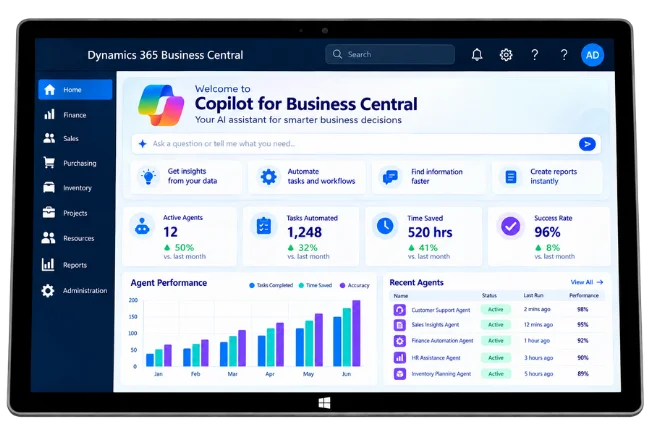

Empower finance and operations teams with AI-powered ERP capabilities that scale with your business.
Deploy Microsoft Copilot securely across Business Central while maintaining governance, compliance, and enterprise-grade security.
Extend your existing ERP with built-in AI that enhances reporting, financial management, inventory control, and operational efficiency.
Help finance, accounting, procurement, warehouse, sales, and executive teams make faster, data-driven decisions using AI.

Generate financial summaries, explain variances, analyze cash flow, simplify account reconciliation, and support faster month-end reporting.

Summarize customer information, identify sales trends, forecast revenue, and provide AI-powered recommendations for improved sales performance.

Optimize inventory planning, identify stock shortages, recommend replenishment actions, and improve warehouse visibility with AI-generated insights.

Analyze purchasing trends, recommend vendors, simplify procurement decisions, and automate purchasing workflows.

Generate executive summaries, create operational reports, analyze KPIs, and answer business questions using natural language.

Reduce manual effort by automating repetitive ERP tasks, simplifying data analysis, and helping employees complete work more efficiently.
Our Microsoft-certified consultants understand both Business Central and Microsoft Copilot, helping you implement AI that complements your ERP processes and delivers real business value.
We begin by understanding your finance, operations, sales, and supply chain processes to identify where Microsoft Copilot can create the greatest impact.
Every Business Central implementation is different. We configure Microsoft Copilot to align with your workflows, reporting needs, compliance requirements, and operational goals.
Extend the power of Business Central by integrating Microsoft Copilot with Microsoft 365, Teams, Outlook, Excel, Power BI, Power Platform, and other Microsoft business applications.
We implement Microsoft Copilot following Microsoft best practices for security, governance, compliance, and responsible AI, ensuring your business data remains protected.
Our partnership continues beyond implementation. We help optimize AI capabilities, train users, introduce new features, and ensure Microsoft Copilot evolves with your business.
End-to-End AI Services to Maximize Your Business Central Investment
Microsoft Copilot for Business Central is more than an AI assistant it’s a powerful capability that transforms how finance, operations, purchasing, inventory, and sales teams interact with their ERP. At Sarakadiya, we help organizations implement, customize, and optimize Microsoft Copilot to improve productivity, automate routine tasks, and enable smarter, data-driven decision-making.
Whether you’re planning to enable Microsoft Copilot, extend AI capabilities, or optimize your existing Business Central environment, our experts provide end-to-end services that help you maximize the value of your ERP investment.





Whether you’re implementing Microsoft Copilot for the first time or looking to enhance your existing Business Central environment, our experts are ready to help you build an intelligent, AI-powered ERP.
Microsoft Copilot in Dynamics 365 Business Central brings AI-powered assistance into your ERP environment, helping teams improve productivity, simplify tasks, and work more efficiently with business data. Before implementation, it is important to understand deployment requirements, licensing, feature availability, and administrative settings.
Copilot capabilities vary depending on the feature, Business Central environment, supported language, region, and installed extensions. Understanding these considerations helps your organization prepare for adoption, evaluate compatibility, and make informed decisions about using AI in daily operations.
As a Microsoft partner, Sarakadiya Inc. helps businesses assess their Business Central environment, evaluate Copilot readiness, and plan an AI adoption approach aligned with their operational needs.

Prepare Your Business Central Environment
Microsoft Copilot in Business Central is available for Business Central Online. Before getting started, organizations should confirm that their environment supports the intended Copilot capabilities and meets the relevant feature requirements.

Understand Licensing and User Eligibility
Copilot capabilities included in Business Central are available at no additional licensing cost beyond the Business Central license. However, specific features, connected services, agents, or additional Microsoft products may have separate prerequisites or licensing requirements.

Check Availability for Your Business Location
Copilot availability depends on the specific capability, supported language, and country or region of your Business Central environment. Not every feature is necessarily available in every location or language.

Configure Copilot for Your Organization
Administrators can manage supported Copilot capabilities through the relevant Business Central settings and permissions. Configuration requirements vary by feature, making it important to review the setup process before enabling capabilities for users.

Evaluate Copilot Within Your Existing ERP Setup
Organizations using customized Business Central environments or third-party extensions should evaluate compatibility with their intended Copilot features. Support for custom pages, tables, and extensions varies by capability and may influence functionality and user experience.

Use AI Insights with Appropriate Oversight
Copilot can help users explore business information, generate suggestions, and simplify repetitive tasks. However, AI-generated responses may be incomplete, inaccurate, or subject to limitations depending on the capability and context. Human review remains important for financial, operational, and other business-critical decisions.










Work seamlessly across Outlook, Excel, Word, Teams, and SharePoint while accessing Business Central data with AI-powered assistance. Create reports, draft emails, analyze spreadsheets, and collaborate without switching between applications.
Bring Business Central insights directly into Microsoft Teams. Summarize financial performance, review operational updates, and collaborate on business decisions without leaving your workspace.
Combine Microsoft Copilot with Power BI to transform ERP data into interactive dashboards, executive reports, and AI-powered business insights that support better strategic decisions.
Extend Business Central with low-code applications, workflow automation, and AI-powered business processes using Power Apps, Power Automate, and Copilot Studio.
Connect Business Central with Dynamics 365 Sales, Customer Service, and Field Service to provide AI-driven insights across customer engagement, finance, and operations.
Integrate Microsoft Copilot for Business Central with CRM platforms, payroll systems, eCommerce applications, banking solutions, document management platforms, and industry-specific software to create a connected digital ecosystem.


















Seamlessly Upgrading an MSP from Business Central 15 On-Premises to Business Central 25 Cloud