Autotask PSA Integration with Business Central

Autotask Integration with Business Central is a Sarakadiya-built integration solution that connects Autotask PSA with Microsoft Dynamics 365 Business Central, helping service organizations align their operational and financial processes.

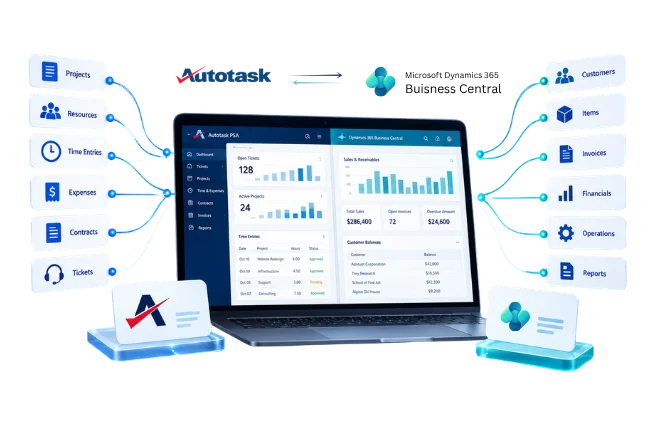
The integration enables automated data exchange between Autotask and Business Central for key business information such as customers, projects, contracts, tickets, time entries, expenses, charges, and invoices.

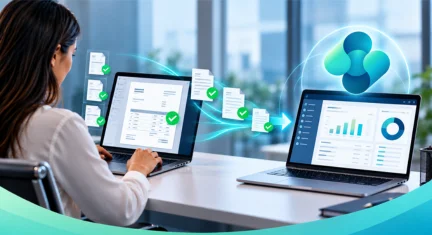
By reducing manual data entry and disconnected workflows, organizations can streamline the path from service delivery to financial processing, improve data consistency, and give operational and finance teams a more connected view of the business.

Autotask PSA Integration with Business Central

Simplify Service Management with Autotask and Business Central Integration

Managing service operations and financial data across separate systems can lead to duplicate data entry, manual reconciliation, and delays in billing. The Autotask PSA integration with Microsoft Dynamics 365 Business Central helps connect these workflows, enabling teams to manage service-related information and financial processes more efficiently.

With automated data exchange across supported business records, your teams can reduce repetitive tasks, improve data consistency, and maintain better visibility from service delivery to invoicing.

Disconnected PSA and ERP Systems

For managed service providers (MSPs) and service-driven organizations, Autotask PSA and Business Central support different but connected business functions. When information must be transferred manually between them, service and finance teams can face avoidable administrative work. 

Manual data entry

Teams may need to recreate customer, project, and billing information across multiple systems.

Delayed Billing

Billable time, expenses, and service charges may require additional processing before reaching financial workflows.

Data Inconsistencies

Customer and project records can become inconsistent when information is maintained separately.

Missed Billable Activity

Manual handoffs can make it harder to identify all eligible time entries, expenses, and charges.

Duplicate Records

Repeated data entry increases the risk of duplicate or conflicting information.

Time-Consuming Reconciliation

Operations and finance teams may spend additional time comparing records and resolving discrepancies.

Key Features of Autotask PSA Integration with Business Central

Connect the Business Records Behind Your Service Operations

The integration connects relevant information from Autotask PSA with Microsoft Dynamics 365 Business Central, helping teams coordinate service activities and related financial processes.

Customer Synchronization

Exchange supported customer information to help maintain consistent customer records across systems.

Project Synchronization

Connect relevant project information to support coordination between service delivery and financial management.

Ticket Management

Integrate supported ticket information to help link service activities with related business processes.

Time Entries and Expenses

Transfer supported time entry and expense information to support the processing of billable service activities.

Charges and Billing

Connect applicable service charges with downstream billing and financial workflows.

Invoice Processing

Exchange supported invoice information to help coordinate billing activities across connected systems.

Contract Synchronization

Connect relevant contract information between Autotask PSA and Business Central to support service agreements and related financial workflows.

Two-Way Data Synchronization

Exchange applicable information between both systems based on configured workflows, helping maintain consistent operational and financial records.

From Service Delivery to Financial Processing

Create a More Connected Service-to-Cash Workflow

Connect the stages between service delivery and finance with an integration that supports the movement of relevant operational information into financial workflows.

01 - Service Delivery

Manage projects, tickets, contracts, time entries, expenses, and other service activities in Autotask PSA.

02 - Billable Activity

Identify eligible time, expenses, and service charges according to your organization's billing processes.

03 - Data Integration

Transfer supported records between Autotask PSA and Business Central through the configured integration workflows.

04 - Financial Processing

Use relevant information in Business Central to support invoicing, accounting, and financial operations.

05 - Connected Records

Give service and finance teams a more consistent view of customer, project, service, and billing information.

06 - Vendor Information

Where supported by the configured integration, synchronize relevant vendor records to support associated financial workflows.

Business Benefits of Autotask PSA Integration

Built for MSPs and Service Organizations

Turn Integration into Operational Efficiency

Support the Workflows That Keep Your Business Moving

Connect service management and financial processes to help teams handle everyday operational tasks with fewer disconnected steps.

Connect the Data Behind Your Business Processes

Align Operational Records with Financial Workflows

Autotask PSA and Microsoft Dynamics 365 Business Central manage different parts of your business. Connecting the relevant records helps teams coordinate service delivery, project activities, and financial processing.

The integration scope defines which records are exchanged and how they support your workflows, based on the connector’s supported capabilities and configuration.

Key considerations include:

Connect the Data Behind Your Business Processes​

Why Sarakadiya?

Business Central Expertise. Integration Built Around Your Processes.

Sarakadiya brings Microsoft Dynamics 365 Business Central expertise to integration projects, helping organizations connect their ERP environment with the systems that support day-to-day operations.

Business Central Expertise

Understand the ERP environment, data structures, and financial workflows involved in the integration.

Business-Focused Integration

Align integration requirements with your operational processes, data mappings, and business rules.

Connected System Workflows

Focus on how service activities and financial processes work together across Autotask PSA and Business Central.

Practical Implementation Focus

Define the integration scope around supported capabilities and your organization's requirements.

Integration That Fits Your Business

Integration That Fits Your Business

Connect Your Existing Systems with a Workflow Designed Around Your Needs

Every service organization has its own customer structures, project processes, billing rules, and financial requirements. Your integration should reflect these requirements and the capabilities supported by your systems.

Sarakadiya can help you assess your Autotask PSA and Business Central workflows, define the relevant integration scope, and determine how connected data can support your operational and financial processes.

Discuss how the integration can support your needs:

Frequently Asked Questions

What is Autotask Integration for Business Central?

It connects supported data and workflows between Autotask PSA and Microsoft Dynamics 365 Business Central to help reduce manual data handling and improve coordination between service and finance teams.

Integration can help reduce duplicate data entry, improve consistency across connected records, and simplify supported workflows between service operations and financial management.

The available data depends on the integration’s supported entities and configuration. Potential areas include organization and customer records, master data, resources, dimensions, items, contracts, and invoice-related information. Confirm the exact scope with Sarakadiya.

Synchronization direction depends on the entity and configured workflow. Confirm the supported direction for each data type before implementation.

Synchronization timing depends on the integration’s available functionality and configuration. Contact Sarakadiya to confirm whether your required workflows support real-time or scheduled synchronization.

The integration may support invoice-related workflows, depending on the configured functionality. The available process and document handling should be confirmed before implementation.

Supported organization and customer records can be mapped according to the integration’s available fields and matching rules.

Dimension mapping may be available for supported workflows. Requirements should be reviewed during implementation.

Availability depends on the current integration scope and implementation status. Contact Sarakadiya to confirm the supported functionality.

Contact Sarakadiya to discuss your existing systems, data requirements, and the workflows you want to connect.

LET'S CONNECT YOUR SYSTEMS

Simplify Your Autotask and Business Central Workflows

Reduce repetitive data entry and help your service and finance teams work with more consistent information.

Talk to Sarakadiya about connecting Autotask PSA with Microsoft Dynamics 365 Business Central.

Directions Paris EMEA 2026 Expo Banner

WE’RE ATTENDING DIRECTIONS EMEA 2026

Date: October 27–29, 2026

We’re excited to be part of Directions EMEA 2026 in Paris, connecting with Microsoft Dynamics 365 Business Central partners, technology leaders, and industry experts.

Dimple Mamtora

Dimple Mamtora

HR Manager

Strategic HR leader specializing in talent acquisition, HR operations, employee experience, and organizational culture. She focuses on building agile, inclusive, and performance-driven workplaces through effective people strategies and streamlined HR practices.
Nisha patel

Nisha Patel

Marketing Manager

Marketing professional specializing in B2B SaaS, ERP ecosystems, and revenue-focused growth, with expertise across demand generation, go-to-market strategy, pre-sales enablement, and customer engagement. She brings a strong ability to connect business strategy with customer needs, driving pipeline growth, solution positioning, strategic partnerships, and measurable business outcomes.

Khushboo Prasad

VP of Technical Operations

Solution Architect specializing in Microsoft Dynamics 365 Business Central and NAV, with expertise across ERP implementations, upgrades, integrations, and business process optimization. She brings strong functional and technical knowledge across Finance, Sales, Purchase, Manufacturing, EDI, Azure DevOps, and Power Platform.
Kishan Nandaniya

Kishan Nandaniya

VP of Strategic Partnerships & Alliances

Vice President of Sales and Solution Consultant specializing in Microsoft Dynamics 365, Power BI, Customer Engagement, and Azure. He helps businesses align technology investments with strategic goals and drive measurable digital transformation.

Mayank Jangid

Sr. Technical Manager

Senior Technical Manager specializing in Microsoft Dynamics NAV and Dynamics 365 Business Central, with expertise in application development, technical consulting, and ERP solutions.

Sagar Dangar

Chief Technical Officer

Solution Architect and CTO specializing in Microsoft Dynamics NAV, Dynamics 365 Business Central, and CRM. His expertise spans enterprise architecture, ERP implementations, integrations, upgrades, custom development, and digital transformation.

Umesh Bobade

Project Lead

Techno-functional ERP Consultant specializing in Microsoft Dynamics 365 Business Central, with expertise in end-to-end ERP implementations, solution mapping, customization, and AL development.

Neha Nanda

Sr. Technical Manager

Senior Technical Manager and Microsoft Dynamics 365 Business Central technical consultant, specializing in ERP development, customization, technical solutions, and application delivery.

Pravin Dangar

Managing Director

Business leader and technology specialist with expertise spanning Microsoft ERP implementations, digital transformation, global accounting, financial structuring, and mining-sector operations. He brings together technology, industry knowledge, and business strategy to create sustainable growth.