






It usually starts with a question from the COO or CFO: can we improve our financial reporting without changing the way our service teams work?
For managed service providers (MSPs), this becomes an important question as the business grows. More customers, recurring contracts, service projects, technician time entries, and billing arrangements create additional demands on finance. The processes that worked when the business was smaller may begin to rely too heavily on spreadsheets, manual data entry, and reconciliation.
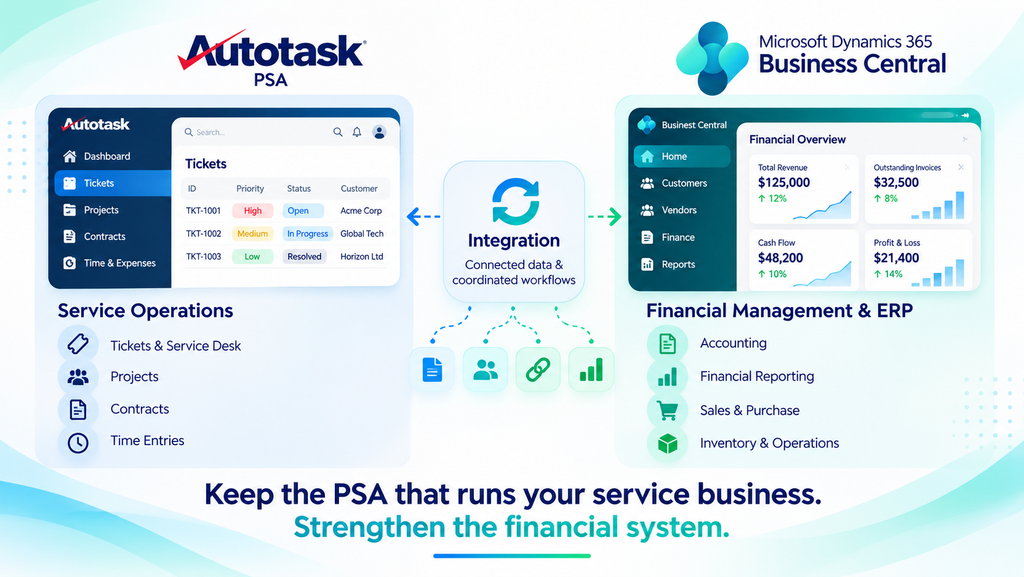
That is often when Microsoft Dynamics 365 Business Central enters the conversation. It offers a broader financial management and ERP foundation, but it can also raise a concern: does adopting a new accounting system mean replacing Autotask PSA?
Not necessarily.
An MSP can outgrow its accounting capabilities without outgrowing the professional services automation (PSA) platform it uses to run service operations. The key is understanding what each system does best and connecting them through an integration designed around the business’s actual workflows.
What Is Autotask PSA?
Autotask PSA is a professional services automation platform from Kaseya designed for managed service providers and IT service businesses. It brings service desk operations, ticketing, contracts, projects, time and expense tracking, billing workflows, and reporting into a shared operational environment.
For an MSP, that connection matters. A technician’s time entry can be associated with a ticket, project, or contract. Service teams can track work against agreed service levels, while billing teams use relevant information to determine what needs to be charged.
Autotask PSA helps coordinate the operational side of delivering IT services. It is not the same as a remote monitoring and management (RMM) tool, which monitors and manages client devices, or an accounting system, which maintains financial records and supports financial reporting.
These systems serve different purposes. Understanding that distinction is the first step toward choosing the right technology setup for a growing MSP.
What Does Autotask PSA Do for MSPs?
Autotask PSA supports the day-to-day processes involved in delivering and billing IT services. Its available capabilities depend on the product configuration and licensing.
Key areas include:
- Service desk and ticketing: Manage service requests, assign work, track ticket status, and monitor service-level commitments.
- Contracts and billing: Maintain service agreements and billing arrangements that help determine how services are charged.
- Projects and resource management: Coordinate project tasks, scheduled work, and resource allocation alongside ongoing service delivery.
- Time and expense tracking: Record technician time and expenses against relevant tickets, tasks, or projects for review and potential billing.
- Reporting: Review operational information such as service activity, workload, utilization, and performance, depending on the available configuration.
These capabilities help MSPs maintain visibility into service delivery and the work performed for customers.
However, as an MSP expands, operational visibility may no longer be enough. Finance may need more structured accounting, broader financial reporting, and stronger oversight of transactions across the business. That is where a dedicated accounting and ERP system can add value.
The Problem Isn’t Autotask. It’s the Gap Between Operations and Finance.
Consider an MSP that has grown steadily over several years. Its service team uses Autotask PSA to manage tickets, contracts, projects, and technician time. Those workflows are established, and the team knows how to use them.
Meanwhile, the finance function is facing a different set of demands. Leadership wants clearer financial reporting, more consistent records, and better visibility into business performance. Finance staff are spending too much time transferring information between systems, checking records, and reconciling differences before transactions can be processed.
The issue is not necessarily that Autotask has stopped working. The business’s financial requirements have changed.
Replacing the PSA may introduce unnecessary disruption if the existing service workflows are doing their job. At the same time, asking the PSA to meet every accounting and ERP requirement may not be the right answer.
The more useful approach is to understand the role of each platform.
| Business area | Autotask PSA | Microsoft Dynamics 365 Business Central |
| Primary purpose | Manage service delivery and PSA operations | Manage accounting, financial processes, and broader ERP requirements |
| Main users | Service teams, technicians, and project managers | Accountants, finance teams, and business leadership |
| Typical information | Tickets, contracts, service projects, and time entries | General ledger, receivables, payables, and financial reporting |
| Business priority | Deliver services and coordinate operational work | Maintain financial records, controls, and business visibility |
The two systems are not competing to perform the same job. Autotask supports service operations, while Business Central provides the financial management foundation.
The opportunity lies in connecting the information that finance needs without forcing service teams to abandon the workflows they already use.
Why Connect Autotask PSA with Business Central?
When service operations and finance work in disconnected systems, information often has to pass through manual steps before it can be used elsewhere. Staff may export records, update spreadsheets, re-enter details, and check whether the information matches across platforms.
Each handoff creates additional work. It can also delay financial processing or introduce inconsistencies that take time to investigate.
An integration between Autotask PSA and Business Central can reduce this friction by allowing supported information to move between the systems according to defined mappings and business rules.
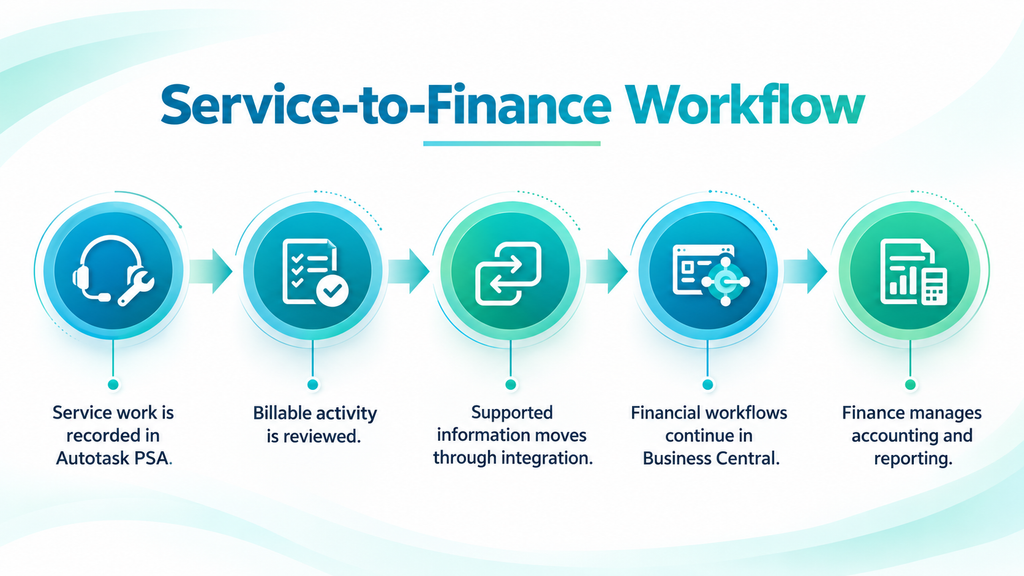
A typical service-to-finance workflow looks like this:
- Service work is recorded in Autotask PSA. Tickets, projects, technician time, and other operational activity are managed in the PSA.
- Billable activity is reviewed. Contract terms, billing rules, and applicable approval requirements are reviewed to determine which activities or charges are ready for billing.
- Supported information moves through integration. Relevant records are exchanged according to the configured mappings and direction of data flow.
- Financial workflows continue in Business Central. Supported billing information can be used in the appropriate financial processes.
- Finance manages accounting and reporting. Business Central provides the financial records and reporting capabilities configured for the organization.
The exact workflow depends on the integration’s supported functionality and the MSP’s configuration. Not every record needs to move between systems, and not every transaction should be processed without review.
The objective is straightforward: reduce avoidable manual work while maintaining the controls the business needs.
Example: Connecting technician time with financial processing
An MSP records technician time against a customer ticket in Autotask PSA. The time entry is reviewed according to the organization’s contract and billing rules. If the activity qualifies for billing and is supported by the configured integration, the relevant information can move into the appropriate Business Central workflow.
Finance can then validate the mapped information and continue with the required billing and accounting processes. The exact records transferred and the steps required depend on the integration configuration and the MSP’s billing procedures.
What Changes for the COO?
For a COO, the value of integration is closely tied to how smoothly service delivery connects with the processes that follow it.
Take a technician who records time against a customer ticket. That entry may be billable, depending on the customer’s contract and the applicable billing rules. If the information has to be exported, re-entered, and checked manually before finance can use it, the process introduces extra administrative work.
A properly configured integration can reduce unnecessary handoffs for supported records. Service teams can continue using Autotask for their operational work, while relevant information is made available to downstream financial workflows.
For the COO, this can mean:
- Less repetitive data handling between operational and finance teams.
- Better coordination between service activity and billing preparation.
- Fewer manual steps when transferring supported information.
- Less pressure to change established service workflows simply to accommodate new accounting requirements.
Integration does not eliminate the need for accurate time entries, contract rules, approvals, or billing controls. It helps the business manage the movement of information between processes more efficiently.
What Changes for the CFO?
As an MSP grows, finance needs to do more than record transactions. Leadership may require clearer reporting, better oversight of financial activity, and more reliable information for decisions about hiring, investment, service profitability, and cash flow.
Microsoft Dynamics 365 Business Central can provide a broader financial management foundation for these needs. However, adopting a new accounting system does not automatically solve problems caused by disconnected operational data.
If finance still relies on manual transfers and duplicate entry, the same problems can follow the business into its new environment.
Connecting Autotask PSA with Business Central can help improve the flow of supported service-related information into financial processes. Depending on the integration scope and configuration, this can support:
- More consistent customer and related business records.
- Better coordination of billable time, expenses, charges, and invoicing workflows.
- Less reconciliation caused by duplicate data entry.
- Stronger financial oversight through Business Central’s accounting and reporting capabilities.
The outcome depends on the quality of the source data, the mapping between systems, the accounting processes in place, and the controls used to review transactions.
For the CFO, the goal is not simply to introduce another platform. It is to establish financial processes that can support the business as its requirements become more demanding.
How Sarakadiya’s Autotask–Business Central Integration Works
Sarakadiya offers an Autotask PSA Integration for Microsoft Dynamics 365 Business Central that connects service operations with financial workflows.
The integration supports data exchange across key business areas, including customer records, projects, contracts, tickets, time entries, expenses, charges, and invoices, subject to the solution’s supported functionality and configuration.
By connecting relevant operational information with downstream financial processes, the integration can help MSPs reduce repetitive data entry, improve data consistency, and streamline service-to-finance workflows.
The records exchanged, synchronization direction, and processing rules should be confirmed against the current integration specification and the organization’s business requirements.
Organizations and customer records
Organization information is important to both service operations and finance. The integration can support the mapping of Autotask organization records to relevant Business Central customer or vendor records according to the configured rules.
Consistent mapping helps teams identify the business relationship behind operational activity and related financial transactions.
Contracts and billing information
Contract and billing information can help connect the commercial terms of a service relationship with the financial processes that follow. The relevant mappings need to reflect how the MSP manages contracts, billing arrangements, and accounting requirements.
The integration’s supported contract and billing workflows should be confirmed against the current product specification before implementation.
Invoices and financial processing
Invoice-related workflows connect service billing with accounting. Depending on the supported mapping, relevant billing information can be used to create or update records in Business Central.
Invoice handling should be tested against the MSP’s actual billing rules, document references, account mappings, and approval requirements before the integration is used in production.
Financial Dimensions and Related Data
Microsoft Dynamics 365 Business Central uses dimensions to classify financial entries and support analysis by areas such as departments, projects, and customer groups.
Where supported by the integration, relevant data mappings can help maintain consistency between operational records and financial processes. Confirm the available dimension mappings, supported fields, and validation rules against the current integration specification before implementation.
What MSPs Should Consider Before Implementation
Connecting two systems is not simply a matter of enabling data exchange. The implementation needs to reflect how the MSP actually operates.
Before getting started, consider the following.
Define which system owns each record
Decide where each type of information should be maintained. For example, Autotask may be the operational source for service activity, while Business Central is the accounting source for financial transactions.
Clear ownership reduces uncertainty about which record should take precedence when information differs.
Confirm the required data flows
Identify which records need to move between systems, in which direction, and for what purpose. A two-way integration does not mean every record should move both ways.
The design should reflect the business requirement rather than trying to exchange every available field.
Review billing rules and approvals
Contract terms, billable time, expenses, charges, and invoice processing need to follow the MSP’s established rules. Integration should support those controls, not bypass them.
Validate mappings and exceptions
Customer records, financial accounts, dimensions, tax-related information, and other mapped fields should be tested against real business scenarios. Teams also need a clear process for handling rejected records, missing data, and mapping errors.
Involve operations and finance early
The COO and service teams understand how work is delivered. The CFO and finance team understand the accounting requirements and controls. Both perspectives are necessary to design a workflow that works beyond the technical implementation.
A well-planned integration starts with business processes and uses technology to support them.
How Sarakadiya Helps MSPs Connect Autotask PSA and Business Central
The value of an integration depends on more than whether two platforms can exchange data. It depends on how well the implementation reflects the MSP’s contracts, billing processes, financial requirements, and day-to-day operations.
Sarakadiya works with Microsoft Dynamics 365 Business Central and offers Autotask PSA integration capabilities for MSPs looking to connect service operations with financial workflows.
The engagement should begin by understanding how your business currently operates and where manual handoffs create unnecessary work. From there, the implementation can focus on the records, mappings, controls, and workflows required to support your processes.
Key areas to address include:
- Discovery and workflow design: Understand service lines, contracts, billing arrangements, and the current flow of information.
- Configuration planning: Define record ownership, mapping requirements, approvals, and exception handling.
- Data preparation and validation: Review the data required for implementation and validate the relevant records before go-live.
- Integration setup and testing: Configure supported mappings and test representative business scenarios, including billing and financial workflows.
- Training and support: Help operational and finance teams understand the processes relevant to their roles.
The scope, delivery approach, and timeline should be established during discovery based on the organization’s requirements and the capabilities included in the agreed solution.
Final Thoughts: Keep the PSA That Works for Your Business
When an MSP outgrows its accounting processes, replacing the system that runs service delivery is not the only option.
Autotask PSA and Microsoft Dynamics 365 Business Central serve different purposes. One supports the operational work involved in delivering services; the other provides a broader foundation for accounting and financial management. Connecting them can help reduce manual handoffs and improve how service-related information reaches finance.
The important part is getting the design right: define record ownership, confirm supported data flows, preserve necessary approvals, and test the workflows that matter to your business.
If your service operations are working well, why should improving your financial systems require you to change them?
Sarakadiya helps MSPs explore how Autotask PSA and Business Central can work together to support their operational and financial requirements.
Ready to discuss your needs? Contact the Sarakadiya team to explore the right integration approach for your business.