

Home / Microsoft Solutions / Dynamics 365 / Field Service
Transform field service operations with Microsoft Dynamics 365 Field Service. Sarakadiya helps organizations connect work orders, customers, assets, technicians, scheduling, inventory, and service processes so field teams can work more efficiently and deliver reliable service experiences.
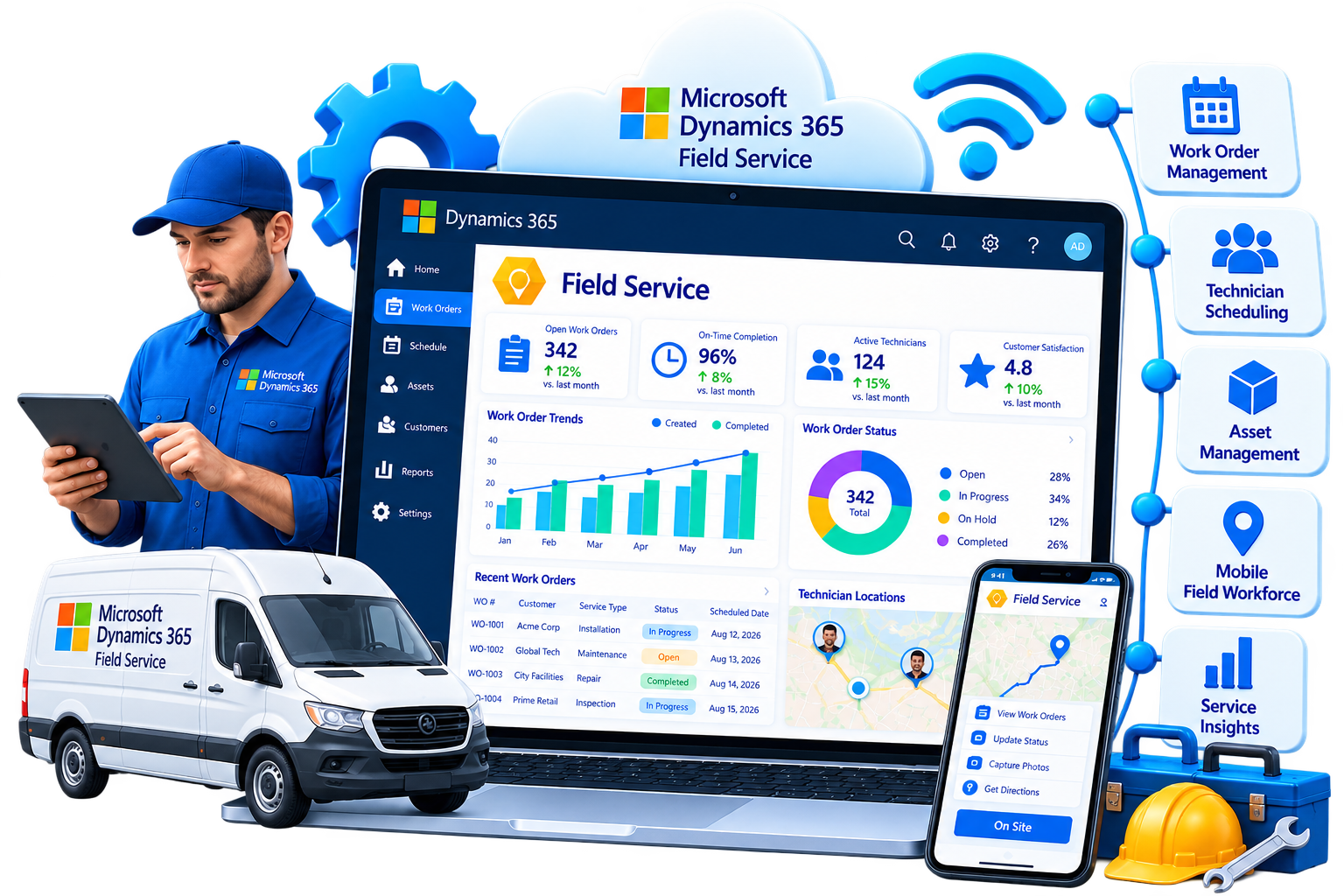

Field service organizations manage a moving operation. Technicians need to reach the right customer, with the right skills, tools, parts, and information – at the right time.
When work orders are managed manually, schedules are difficult to optimize, asset information is disconnected, and technicians lack access to the information they need in the field, service delivery becomes harder to manage. Sarakadiya helps organizations modernize field service operations by connecting work orders, resources, customer assets, scheduling, mobile teams, inventory, and service data.
A service request becomes a work order. A dispatcher needs to find the right resource. A technician needs customer, asset, work, and inventory information. The work needs to be completed, documented, and followed through.
Microsoft Dynamics 365 Field Service helps organizations plan, deliver, and manage field service operations across people, assets, and processes. Microsoft identifies work order management, resource scheduling, asset tracking, mobile capabilities, and connected service operations as core areas of the application.
Sarakadiya helps businesses design and implement Field Service solutions around their service model, workforce, assets, customers, and operational objectives.
Replace spreadsheets, paper-based processes, disconnected applications, or legacy field service platforms with a connected solution.
Support preventive maintenance, recurring service, agreements, asset visibility, and more proactive service models.

Create a structured field service foundation that can scale as technician teams, customers, assets, and service volumes grow.

Connect customers, locations, assets, service history, maintenance activities, and technicians.

Give technicians access to relevant work information through a purpose-built mobile experience.

Match work requirements with technician skills, availability, location, territories, and other scheduling constraints.
Modern field service requires more than a scheduling calendar. You need to coordinate customers, work orders, resources, assets, locations, skills, parts, schedules, and service information across the entire service lifecycle. Microsoft Dynamics 365 Field Service brings these operational capabilities together and connects them with the broader Microsoft ecosystem.
Create, manage, schedule, execute, and complete work orders for installations, repairs, inspections, maintenance, and other field service activities. Microsoft documents work orders as the central record for defining work that needs to be performed and coordinating activities and resources.
Match service requirements with the right resources based on skills, availability, location, territories, and other constraints. Field Service uses Universal Resource Scheduling, with scheduling available through the schedule board, Schedule Assistant, and Resource Scheduling Optimization.
Automatically optimize schedules and resource assignments to help reduce travel time and improve resource utilization. Microsoft's Resource Scheduling Optimization add-in can automatically schedule work based on job requirements and resource attributes and optimize routes and travel. It requires a separate license.
Track equipment and assets at customer locations, including service history and related field service information.
Give technicians access to assigned work, customer information, assets, instructions, activities, and service history through the Field Service mobile experience. Microsoft's current roadmap continues to invest in Field Service Mobile usability and offline capabilities.
Monitor work orders, scheduling performance, technician activities, service operations, and customer interactions through analytics and reporting.
Support recurring and planned service through agreements, maintenance schedules, and work order generation.
Manage truck stock, purchase requests, fulfillment, and product returns as part of field service operations.
Use inspections to standardize field checks, capture information, and document service execution.
Use Microsoft Copilot capabilities to help managers, dispatchers, and technicians work with Field Service information, summarize work orders, and update information more efficiently.
Our Microsoft Dynamics 365 Field Service experts can assess your current service environment, identify operational gaps, and design a solution aligned with your workforce, assets, customers, and service objectives.
Field service transformation is more than putting work orders into a digital system. It is about helping dispatchers schedule intelligently, helping technicians arrive prepared, giving managers operational visibility, and creating a more consistent service experience for customers.
At Sarakadiya, we combine Microsoft Dynamics expertise with a business-first approach to help organizations modernize field operations, streamline service processes, improve workforce productivity, and build a scalable foundation for service growth. From consulting and implementation to customization, integration, automation, analytics, mobile enablement, and ongoing support, we help businesses get more value from their Microsoft investment.
Help technicians access relevant information, update work, capture service details, and stay connected while working in the field.

We start by understanding your service model, technician workforce, scheduling processes, assets, customer commitments, inventory requirements, and business objectives.

Our team helps organizations plan, implement, configure, integrate, and optimize Field Service around their operational requirements.

No two field service organizations operate the same way. We align Field Service with your work order processes, resource structure, territories, skills, scheduling rules, assets, and service requirements.

We look beyond system configuration to identify opportunities to simplify workflows, reduce manual work, improve scheduling, and strengthen service execution.

Extend Field Service through Microsoft 365, Teams, Power Platform, Power BI, Business Central, Supply Chain Management, Project Operations, and other business systems.

Our support doesn't end at go-live. We help you optimize, enhance, support, and evolve your field service environment as your business changes.
Whether you are replacing spreadsheets and manual processes, improving technician scheduling, modernizing work order management, connecting customer assets, enabling your mobile workforce, or looking for better visibility into field operations, Sarakadiya can help.
Whether you’re implementing Field Service for the first time, replacing a legacy field service platform, optimizing an existing environment, or looking to improve technician productivity and scheduling, Sarakadiya provides services across the field service transformation lifecycle.

Build a clear roadmap for your field service transformation. We assess your work order processes, workforce, scheduling model, assets, mobile requirements, inventory, reporting, and business objectives to identify opportunities for improvement.

Implement a modern field service platform designed around your service operations. From discovery and solution design through configuration, testing, training, mobile deployment, and go-live, our experts help deliver a structured implementation.

Move from spreadsheets, paper-based processes, legacy field service applications, or disconnected systems to a connected field service environment.

Improve how you assign technicians and manage field service schedules.
We help organizations configure scheduling processes around resource availability, skills, territories, locations, priorities, and service commitments.

Connect Field Service with the systems your business already uses.
Microsoft documents integrations for Field Service with Teams, Project Operations, Supply Chain Management, Business Central, and other Microsoft technologies.

Keep your field service environment optimized as your business evolves.
Our support services help service organizations resolve issues, improve system performance, support technicians and dispatchers, implement enhancements, and continuously improve field operations.

Reduce repetitive administrative work across field operations.
We help automate work order creation, assignment, notifications, approvals, recurring service processes, status updates, and other workflows.

Turn operational data into actionable service insights.
We help organizations understand work order performance, technician productivity, scheduling efficiency, service trends, asset performance, and customer outcomes.
Microsoft Dynamics 365 Field Service helps organizations plan, schedule, execute, and manage field service operations across work orders, resources, assets, mobile workers, inventory, and service processes.

Manage Field Work From Request to Completion
Work orders define what needs to be done and help coordinate the activities and resources required to complete the work.
They can support installations, repairs, inspections, preventive maintenance, and other field service scenarios.

Put the Right Resource on the Right Job
Match service requirements with resources based on skills, availability, location, territories, working hours, and other constraints.
Field Service uses Universal Resource Scheduling for its scheduling framework.

Optimize Schedules, Routes & Resource Utilization
For organizations with complex scheduling requirements, Resource Scheduling Optimization can automatically schedule work based on job requirements and resource characteristics while considering travel and other constraints.
Microsoft identifies Resource Scheduling Optimization as a separately licensed add-in, so it should not be presented as automatically included with every Field Service deployment.

Understand the Equipment You Service
Maintain visibility into customer assets, their locations, service history, and related service activities.

Move From Reactive Service to Planned Maintenance
Support recurring service and maintenance through customer agreements and scheduled work.

Give Technicians the Information They Need in the Field
Enable frontline workers to access assigned work, customer information, assets, service tasks, and relevant service information through the Field Service mobile experience.
Microsoft’s 2026 Field Service roadmap continues to improve mobile usability and offline support.

Standardize Field Checks & Capture Service Information
Use inspections to help technicians follow standardized processes and capture structured information during field work.

Keep Technicians Equipped to Complete the Job
Manage products and parts used during field service, including truck stock, purchasing requests, fulfillment, and returns.
Microsoft documents truck stock, purchase order requests and fulfillment, and product returns as Field Service capabilities.

Bring Intelligence Into Field Operations
Use Microsoft Copilot capabilities to help service managers, dispatchers, and technicians work with Field Service information and reduce time spent on administrative activities.
Current capabilities include work order summaries and assistance with updating information, while Microsoft’s 2026 roadmap continues to expand Copilot experiences across web, mobile, and Microsoft 365.

Turn Field Operations Data Into Actionable Insights
Monitor work orders, scheduling, resources, service performance, customer interactions, and operational trends.
Microsoft identifies analytics for work orders, scheduling activities, and customer interactions as part of Field Service reporting capabilities.
Our Microsoft Dynamics 365 Field Service experts can help you identify the right capabilities, configure the platform to your needs, and support a successful field service transformation.
Every industry has different service models, assets, workforce structures, maintenance requirements, and customer expectations. Sarakadiya combines Microsoft Dynamics 365 Field Service expertise with industry-focused consulting to help organizations build field service operations around the way their business actually works.

Connect field technicians, equipment, assets, work orders, and maintenance processes to support reliable service delivery.

Manage field operations across stores, equipment, facilities, service requests, and maintenance activities.

Coordinate field service and maintenance activities across facilities, assets, locations, and distributed operations.

Connect service operations with customers, equipment, assets, technicians, and inventory.

Support service and maintenance for equipment, facilities, production environments, and customer locations.

Manage property maintenance, service requests, assets, facilities, and field resources across locations.

Coordinate onsite service activities, installations, technical support, and field resources where customer engagements require physical delivery.

Connect field service operations with customers, equipment, service requests, technicians, and inventory.

Support hardware, infrastructure, equipment, installations, and technical service operations across customer locations.

Coordinate field activities, equipment, assets, service requirements, and resources across construction environments.

Connect customers, equipment, technicians, work orders, scheduling, parts, and service history in one field service environment.

Support field service for medical equipment, facilities, assets, and maintenance operations while considering applicable regulatory and privacy requirements.

Support equipment, vessel, facility, and field service operations through connected work orders, assets, technicians, and service information.
Your field service platform should not operate in isolation. Sarakadiya helps connect Microsoft Dynamics 365 Field Service with the systems your field teams, dispatchers, service managers, finance teams, and operations teams rely on.
Connect Field Service with Microsoft productivity and collaboration tools to support communication, scheduling, and service operations.
Enable collaboration between technicians, dispatchers, service managers, and other stakeholders.
Use Power Apps, Power Automate, Power BI, and Dataverse to extend field service processes, automate workflows, and analyze operational data.
Connect field service with financial, customer, inventory, purchasing, and operational processes in Business Central. Microsoft specifically documents Business Central integration within the Field Service ecosystem.
Connect field service operations with supply chain, inventory, products, and other operational processes where required. Microsoft documents Field Service integration with Supply Chain Management.
Connect service requests, customer information, asset data, ERP systems, eCommerce platforms, IoT solutions, and other business applications where required.
Connect field service work orders with project tasks and project-driven service operations. Microsoft continues to enhance this integration, including task-level work order associations and project-driven scheduling behavior.
Connect customer service cases with field work when an issue requires an onsite visit or technician intervention.

















Service leaders need to understand whether the right technician is assigned, how efficiently resources are being used, how much time is spent traveling, whether assets are receiving the right maintenance, and where service operations can improve.
Sarakadiya helps organizations create a connected field service foundation that supports better decisions across the service organization.
Connect work orders, activities, resources, customers, assets, and service information in one environment.
Give technicians mobile access to relevant work, customer, asset, and service information.
Match work requirements with the right resources based on skills, availability, location, and other constraints.
Use scheduling and optimization capabilities to improve technician routes and resource assignments.
Move beyond reactive service by supporting recurring maintenance and planned service activities.
Track customer assets and their service history to help teams understand equipment and maintenance requirements.
Give technicians better access to work instructions, customer history, asset information, knowledge, and required parts.
Use analytics and reporting to understand work order performance, scheduling efficiency, technician activity, and service trends.
Build field service processes that can evolve as technician teams, customers, assets, locations, and service volumes grow.
A successful field service transformation does not end when Dynamics 365 Field Service goes live.
Sarakadiya works with organizations across the field service transformation lifecycle, from strategy and implementation to scheduling optimization, mobile enablement, automation, analytics, adoption, and ongoing support.
Explore how organizations can modernize service operations, scheduling, mobile work, and asset visibility with Sarakadiya’s Microsoft expertise.
Helping service teams connect work orders, assets, technicians, and scheduling in Microsoft Dynamics 365 Field Service.
Improving technician productivity with connected mobile access to work orders, service history, and customer asset data.
Helping dispatchers improve resource utilization, reduce travel time, and create more reliable service schedules.
Microsoft Dynamics 365 Field Service is Microsoft’s field service management application for planning, scheduling, delivering, and managing service operations across work orders, resources, assets, technicians, and service processes.
Dynamics 365 Field Service helps organizations manage work orders, schedule resources, track customer assets, support technicians through mobile tools, manage preventive maintenance, coordinate inventory, and analyze field service operations.
Dynamics 365 Field Service is part of the Dynamics 365 business applications ecosystem and uses CRM capabilities and Dataverse, but its primary purpose is field service management and service execution rather than general sales CRM.
A work order defines the work that needs to be performed and helps coordinate the activities and resources required to complete that work. Work orders can support installations, repairs, preventive maintenance, inspections, and other field service activities.
Yes. Field Service uses Universal Resource Scheduling to help match service requirements with appropriate resources based on factors such as skills, availability, location, and other constraints.
Resource Scheduling Optimization is a separately licensed add-in that can automatically schedule work and optimize resource utilization based on job requirements, resource attributes, travel, and other scheduling constraints.
Yes. Dynamics 365 Field Service includes a mobile experience designed for frontline workers to access work orders, customer information, assets, service tasks, and other field service information. Microsoft continues to invest in mobile usability and offline capabilities.
Yes. Field Service provides capabilities for managing customer assets and their service history, helping organizations understand the equipment they maintain and service.
Yes. Field Service supports customer agreements and recurring work order scenarios that can be used to support planned and preventive maintenance processes.
Yes. Field Service includes capabilities for managing truck stock, products, purchasing requests, fulfillment, and returns.
Yes. Microsoft provides Copilot capabilities for Field Service, including work order summaries and assistance for managers, dispatchers, and technicians. Microsoft is also expanding AI capabilities and agentic scheduling experiences. Some 2026 capabilities remain planned or in preview, so availability depends on Microsoft’s release status, licensing, configuration, and region.
The Scheduling Operations Agent is part of Microsoft’s planned agentic scheduling capabilities for Field Service. Microsoft describes it as helping automate schedule optimization. As of Microsoft’s 2026 release plan, some of these capabilities are planned for future availability, so they should not be marketed as universally available today.
Yes. Microsoft documents Business Central integration within the Dynamics 365 Field Service ecosystem, allowing organizations to connect field service operations with financial and operational processes.
Yes. Microsoft documents integration between Field Service and Dynamics 365 Supply Chain Management.
Yes. Microsoft provides Field Service and Project Operations integration, including work order associations with project tasks and project-driven scheduling scenarios.
Yes. Organizations can configure and extend Field Service to support their work order processes, scheduling rules, resources, assets, mobile experiences, workflows, integrations, and reporting requirements.
The total cost depends on factors such as Microsoft licensing, number of technicians and dispatchers, work order complexity, scheduling requirements, mobile deployment, data migration, integrations, customizations, Resource Scheduling Optimization, reporting, and implementation scope.
Implementation timelines vary based on workforce size, scheduling complexity, work order processes, asset data, mobile requirements, integrations, data migration, customizations, and project scope.
Yes. Sarakadiya can provide functional and technical support, optimization, mobile support, enhancements, training, health checks, consulting, and ongoing Dynamics 365 Field Service services.
Whether you’re replacing spreadsheets and manual processes, improving technician scheduling, modernizing work order management, connecting customer assets, enabling your mobile workforce, or looking for better visibility into field operations, Sarakadiya can help.
Our Microsoft Dynamics 365 Field Service experts can assess your current service environment, identify operational opportunities, and help you build a connected, scalable field service foundation for growth.