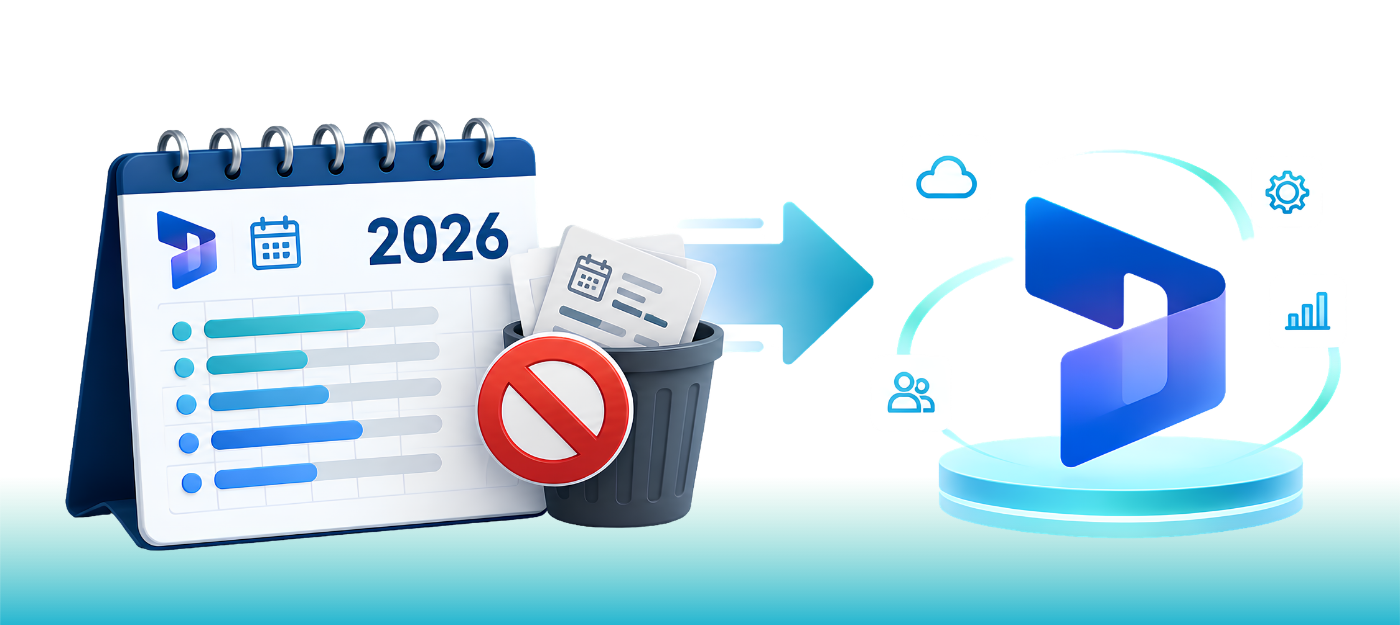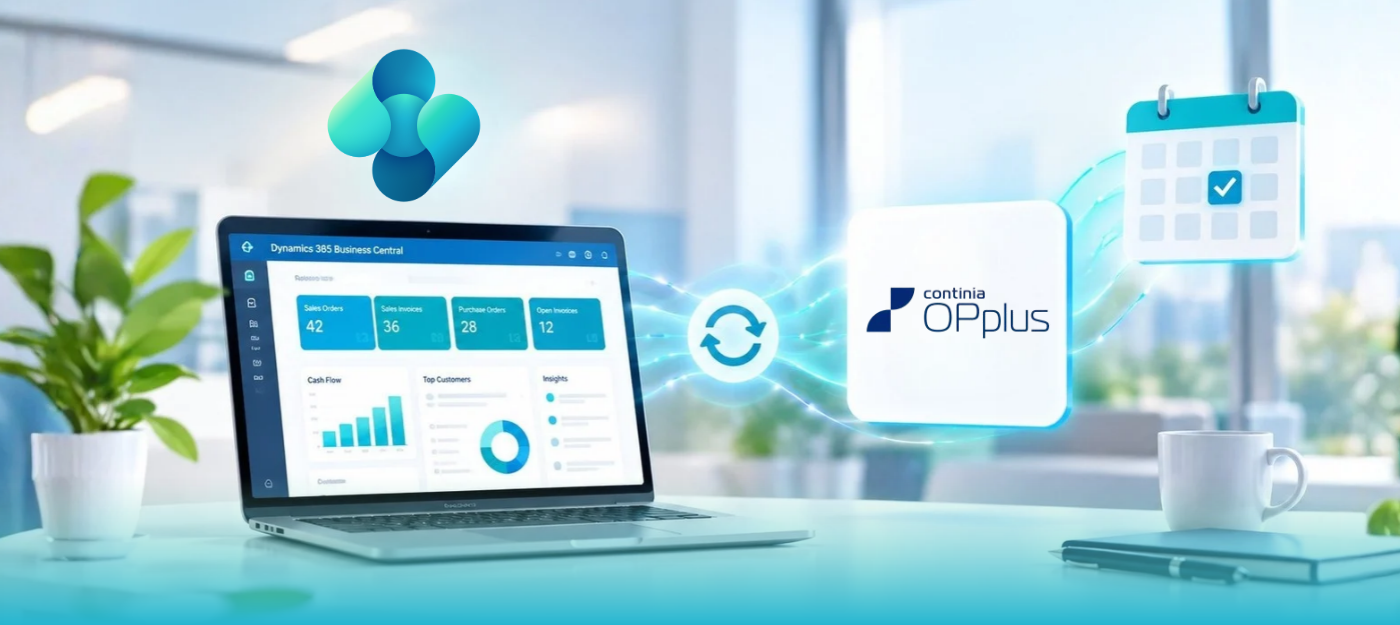





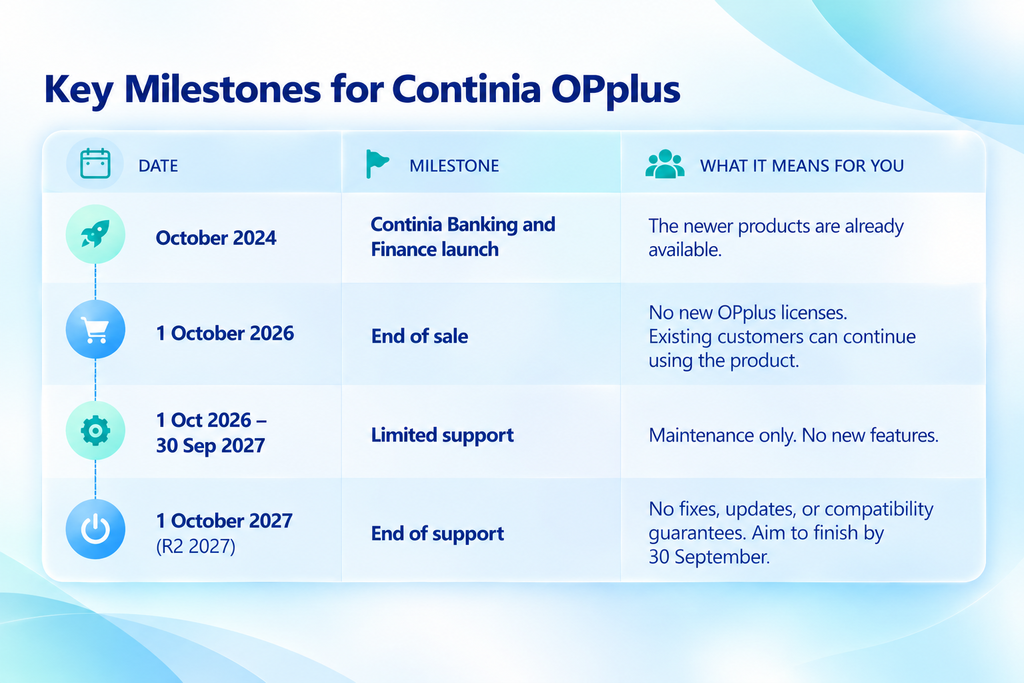
OPplus end of support is now on the calendar. Continia will discontinue new sales of OPplus on 1 October 2026, while limited support will continue until 1 October 2027. No further development is planned.
If your finance team runs payments, bank imports or reconciliation through OPplus in Microsoft Dynamics 365 Business Central, this is worth your attention. Nothing stops working overnight. While OPplus will continue to receive limited support during the transition period, no further development is planned. For Business Central online customers in particular, Continia says future compatibility cannot be guaranteed. Teams that plan early get a calm year. Teams that wait get rushed.
This guide keeps things simple. You’ll get the exact dates, what they mean for your business, where each OPplus area goes, and how to migrate OPplus to Continia Banking and Finance without nasty surprises.
Continia stops selling OPplus on 1 October 2026 and ends support on 1 October 2027. Existing customers can keep using it until then, but no new development is planned. The migration path uses Continia Banking for banking and payment functionality and Continia Finance for supported OPplus finance functionality. The exact destination depends on the OPplus modules and functionality in use. Start planning now, because the migration needs proper testing.
What is OPplus?
OPplus is an add-on for Microsoft Dynamics 365 Business Central. It extends Microsoft Dynamics 365 Business Central with functionality for payment import and payment export, bank-related processes, G/L open entries, fixed assets, treasury, factoring, and other financial processes. Continia took over the product when it acquired gbedv, the company that built it.
What did Continia announce about OPplus?
The announcement appears at the top of Continia’s OPplus documentation. In plain terms, this is what it says:
- 1 October 2026: New OPplus sales end.
- Until 1 October 2027 (R2 2027): Limited support continues. No further development is planned.
- After 1 October 2027: Support is discontinued.
Continia advises existing customers to plan their move to Continia Banking before support ends. This applies to both Business Central online and on-premises. Online users get an extra warning: Continia says it can’t guarantee that OPplus will stay compatible with future Business Central versions.
A note on the support date: Continia’s current OPplus documentation states that limited support continues until 1 October 2027, after which support is discontinued. For project planning, we recommend completing your migration before the support deadline rather than scheduling the cutover at the last possible moment.
The question to ask: Not “does OPplus still work today?” but “will our setup keep meeting our needs as Business Central keeps changing?”
Why is Continia retiring OPplus?
Continia bought gbedv, the company behind OPplus, when the product already had more than 3,500 customers. Since then, it has built two newer products to cover the same ground: Continia Banking and Continia Finance. Both have been available since October 2024.
Continia has not stated a detailed reason for discontinuing OPplus in the documentation. What is clear is that Continia is directing customers toward Continia Banking and Continia Finance, which have dedicated migration paths from OPplus. Continia’s documentation also states that no further OPplus development is planned. That’s a normal software lifecycle. It’s also why waiting won’t make the migration cheaper or easier.
Before you plan anything, take stock of what you use today: which OPplus modules are live, which Business Central version you run, which banks are connected, and whether any customizations depend on OPplus. Everything else builds on that list.
What does OPplus end of support mean for Business Central users?
OPplus won’t stop working on the last support date. The real issue is what happens when one part of your system stops changing while everything around it keeps moving. Think slow puncture, not blowout.
During the limited-support period, no further product development is planned. After support is discontinued, customers should not assume that OPplus will continue to receive fixes, updates, or compatibility support. After support ends, three things build up:
- Compatibility. Business Central continues to evolve, while Continia states that future compatibility of OPplus cannot be guaranteed for Business Central online customers.
- Banking and payment rules. Payment formats and regulatory requirements change over time. An unsupported payment tool won’t be kept up.
- IT and audit questions. Unsupported software in the payment process tends to raise questions in security reviews and audits.
The danger isn’t the date itself. It’s reaching it without enough time to assess, test, and migrate.
Which OPplus modules are affected, and where do they go?
Start by finding out exactly which OPplus features you use. Continia’s documentation lists in these areas: Payment Import, Payment Export, Associations, G/L Open Entries, Extended Lists and Reports, Extended Fixed Assets, Trial Balance and VAT, Treasury and Factoring. Continia provides migration paths from OPplus to Continia Banking and Continia Finance. The destination depends on the functionality being migrated, and Continia provides detailed field-mapping references for the Finance modules.
| OPplus area | Relevant Continia solution |
| Payment import and export | Continia Banking |
| Bank connectivity and reconciliation | Continia Banking |
| Direct debit and related payment processes | Continia Banking |
| Associations | Continia Finance |
| Extended lists and reports | Continia Finance |
| Balance sheet and VAT functionality | Continia Finance |
| G/L open entries | Continia Finance |
| Extended fixed assets | Continia Finance |
| Treasury | Continia Finance |
| Factoring | Continia Finance |
Important: This is a high-level planning view, not a one-to-one replacement map. The actual migration scope depends on the OPplus modules, configuration, customizations, integrations, and Business Central environment. Continia provides detailed field-mapping references that should be reviewed before finalizing the migration scope.
A word on cost. Continia introduced a new pricing model with Banking and Finance, and partners report that Finance includes a free base module. Your OPplus license won’t map one-to-one, so ask your reseller for a quote early.
What changes when you move from OPplus to Continia Banking?
Moving from OPplus to Continia Banking is not a one-to-one copy of the existing setup. The migration moves supported data and functionality into Continia Banking, but the resulting configuration depends on the OPplus functionality, bank connections, payment processes and Business Central environment you use.
- Direct bank connectivity. Continia Banking supports bank connectivity for supported banks and localizations, allowing businesses to manage supported banking processes directly within Business Central.
- Payment matching and reconciliation. Continia Banking provides functionality for matching and applying payments, including rules that can help automate parts of the reconciliation process.
- Payment controls. Depending on the configuration and supported functionality, Continia Banking provides capabilities such as payment approval workflows and bank account verification within the payment
- Additional banking functionality. Continia Banking supports a range of banking and payment processes, including supported payment formats, direct debit processes and other banking-related workflows depending on the applicable localization and configuration. process.
Before migration, compare these capabilities with the processes your finance team currently runs in OPplus. The goal is not simply to reproduce the existing setup, but to make sure the required banking and payment processes are supported, tested and configured correctly in Continia Banking.
How to migrate OPplus to Continia Banking and Finance
Continia provides migration tools for supported scenarios. The tools move the data. You handle the preparation, testing, and sign-off.
Before you begin
Check these prerequisites first:
- Business Central version 26 or later (on premises)
- OPplus 26.0.0 or higher is installed.
- All OPplus Payment Import Registers have been posted.
- All OPplus Payment Proposals have been posted.
- All open journals have been posted or deleted.
- You have administrator access and the permissions required to install the relevant apps.
- Continia Banking for your localization is installed.
- The Continia Banking Migration OPplus app is installed from Microsoft Marketplace.
The migration steps
- Migrate Continia Finance first, if required. The migration wizard guides you through the Finance migration, which must be completed before the Banking migration can proceed.
- Open Continia Banking/Finance Data Migration Setup. The wizard performs pre-validation checks before migration.
- Review the data selection. It’s for information, so you can’t edit it, but check that it matches what you expect. Also decide whether the tool should verify bank accounts that aren’t verified yet.
- Check bank availability. If a bank isn’t supported, you can send Continia a request from the wizard inside.
- Accept the terms and click Migrate Data. The tool switches OPplus off and Banking (and Finance, if used) on.
- Do the post-migration checks. Confirm bank accounts, financial data and permissions, and assign the Continia Banking permission sets.
- OPplus permission sets are not migrated. Assign the appropriate Continia Banking permission sets to users after migration.
Always rehearse in a sandbox first. Use the rehearsal to identify mapping gaps, permission issues, and process differences before production. Continia also recommends retaining access to a pre-migration environment where historical OPplus information, such as registered payment proposals, payment advices, and historical imports, may need to be reviewed.
Five OPplus migration mistakes to avoid
These come straight from Continia’s prerequisites and the usual pattern of finance system cutovers.
- Starting with unfinished payments. Continia requires OPplus Payment Import Registers and Payment Proposals to be posted before migration, and open journals must be posted or deleted. Plan a cutover window with no outstanding financial processing.
- Ignoring remittance and payment-information differences. Review your existing payment and remittance setup during the migration assessment and test the resulting configuration in the sandbox before production cutover.
- Assuming that every bank is ready. Check each bank connection against Banking’s supported list. A missing bank is a dependency you don’t want on the critical path.
- Getting the order wrong. If you use Finance, migrate it first and leave OPplus active until the Banking step is done.
- Forgetting permissions. Users who could do a task in OPplus may need new permission sets in Banking and Finance. Extensions that log changes to master or setup data may also need extra permissions for the migration user.
A realistic OPplus migration timeline
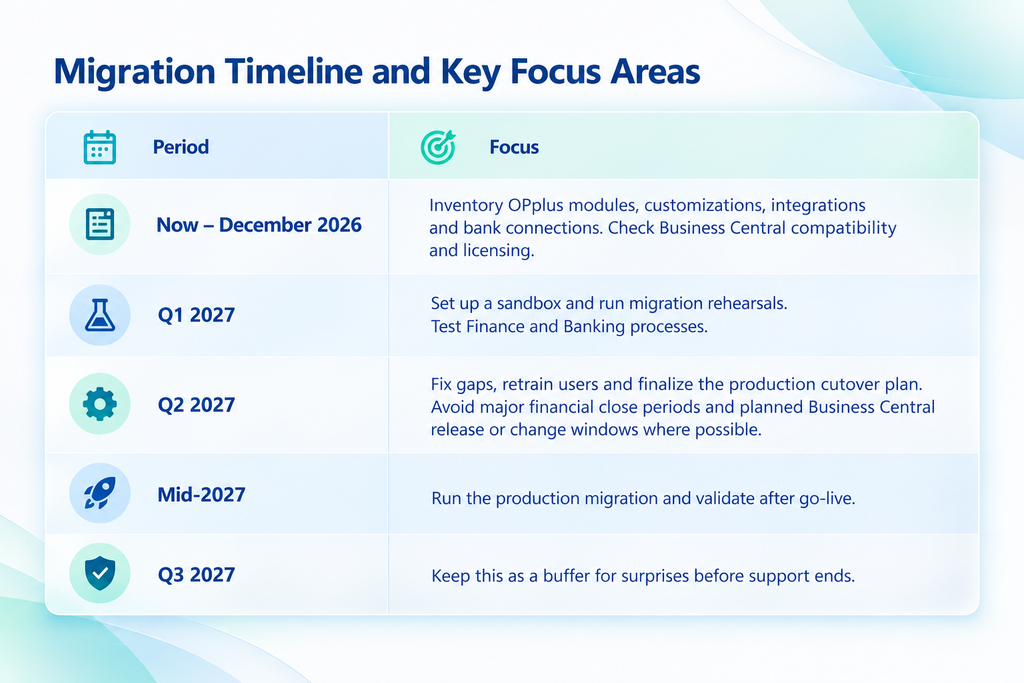
Continia hasn’t published a recommended migration schedule. This is Sarakadiya’s own planning framework, with a buffer built in.
Who needs to do what: a role-by-role view
OPplus migrations stall when they’re treated as an IT task only. Payments touch too many people for that. A simple split of work keeps things moving:
Finance Leadership: Sponsor the project, approve the license budget and agree with a cutover window that fits the close calendar.
AP, AR and treasury: List every bank connection, payment format, approval step and remittance layout you use, and flag anything unusual.
Business Central admins and IT: Confirm versions, prepare the sandbox, sort out permissions and test the migration tools end to end.
Your Business Central partner: Map OPplus customizations to Banking and Finance, run the rehearsal and support go-live.
Are you ready? A six-question self-check
Answer yes or no to each question:
- Can you name every OPplus module and feature your team uses?
- Do you know which Business Central and OPplus versions you run?
- Do you know which banks and payment processes are connected?
- Do you know if any customizations or integrations depend on OPplus?
- Do you know which historical OPplus data must stay accessible, and which users need the new Continia apps?
- Do you have a sandbox or test environment for rehearsal?
If you cannot answer several of these questions confidently, it is worth starting your assessment now. The goal is not to rush the migration, but to give your team enough time to assess, test, and plan the cutover.
Should you migrate as-is or redesign?
Moving with minimal process change can reduce the scope of the migration, while redesigning may make sense where processes are heavily customized or newer functionality better meets the business requirement.
Ask three questions. What do we actually use today? Which parts are essential? Which parts exist only because of an old workaround? You don’t have to redesign everything. The goal is simple: move from an OPplus-dependent setup to a supported one without losing the processes and information your finance team needs.
How Sarakadiya can help with OPplus migration
Sarakadiya is a Microsoft Dynamics 365 Business Central partner. It helps businesses implement, optimize and support Microsoft Dynamics 365, Business Central, Copilot and Power Platform solutions worldwide. For OPplus users, a typical engagement has four parts:
- Discovery: an inventory of your OPplus modules, customizations and bank connections
- Sandbox rehearsal: a full trial migration, so mapping gaps show up before production does
- Cutover: the live migration, with your finance team validating the results
- Post-go-live support: permission clean-up, rule tuning and user training
Want a second pair of eyes on your plan? Talk to the Sarakadiya team.
Frequently Asked Questions
Key Takeaways
- New OPplus sales end on 1 October 2026. Support ends on 1 October 2027 (30 September per Continia’s product page), and no further development is planned.
- Continia Banking and Continia Finance replace OPplus. Banking covers payments, and Finance covers the other modules.
- Business Central online users should pay particular attention to compatibility, because Continia states that future OPplus compatibility cannot be guaranteed.
- Migration needs preparation: OPplus Payment Import Registers and Payment Proposals must be posted, open journals must be posted or deleted, Finance migration must be completed before Banking migration, and permissions must be reviewed.
- Rehearse in a sandbox before production, and back up anything the tool doesn’t transfer.
- Start your inventory early and give yourself enough time for assessment, sandbox testing, remediation, and production cutover before support ends.
OPplus is not scheduled to stop working on 1 October 2026. That date marks the end of new sales. Limited support continues until 1 October 2027, giving existing customers time to assess their environment, plan the migration, test in a sandbox, and complete the transition before support ends.