




Key Highlights
- The Dynamics 365 Sales MCP server exposes 20 named tools that let compatible AI agents research leads, assess qualification, analyze opportunities, and draft outreach.
- Sales MCP focuses on sales-specific research, analysis, summaries, and generation. It can also work with Dataverse record operations. Dataverse MCP provides broader Dataverse capabilities and can be connected when an agent needs additional data, schema, record, or file operations.
- Microsoft Copilot Studio connects to MCP servers, including Sales MCP and Dataverse MCP. Other MCP clients, such as VS Code with GitHub Copilot and other compatible AI applications, can also connect with some client-specific limitations.
- Claude Desktop is currently not supported as a client for the Sales MCP server, though it is supported for Dataverse MCP.
- MCP usage and Copilot Studio credit consumption depend on the underlying agent feature, licensing, and how the MCP capability is being used. Specific licensing exemptions may apply, so current Microsoft licensing guidance should be checked for the deployment.
- The right starting point is a specific sales process with a measurable time cost, not the MCP technology itself.
What is Dynamics 365 Sales MCP ?
Sales teams already have the data. A lead has company details in the CRM, activity history in Dynamics 365 Sales, contract documents in SharePoint, and additional context scattered across other business systems. The problem was never data availability; it was assembling the right pieces at the moment a seller needed them, without hand-building a custom integration for every AI experience that wanted access.
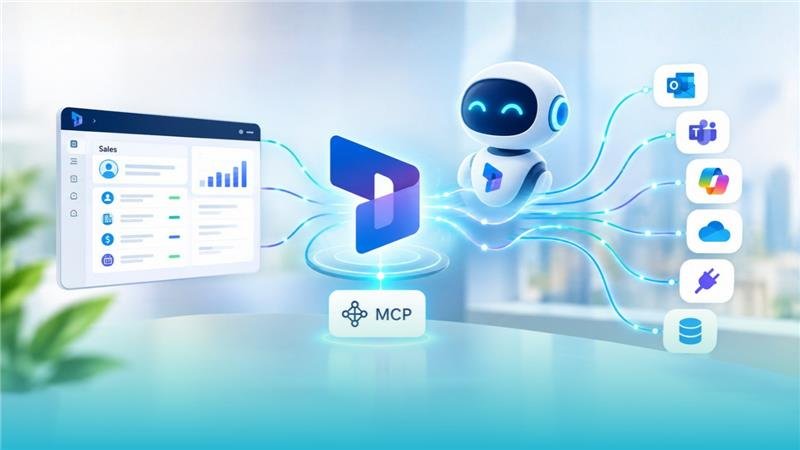
Model Context Protocol (MCP) is an open standard that gives AI agents a consistent way to discover and call tools exposed by connected systems. The Dynamics 365 Sales MCP server is Microsoft’s implementation for sales: a Microsoft-hosted MCP server that exposes sales-specific tools an agent can call to retrieve research, generate insights, and draft outreach.
The distinction worth holding onto: MCP is the protocol. The Sales MCP server is one specific implementation of it, scoped to sales scenarios. Dataverse has its own, separately scoped, MCP server more on that below.
Why Does MCP Matter for Dynamics 365 Sales?
The problem most sales teams have isn’t a lack of CRM data, it’s the time cost of assembling it before acting. Before contacting a new lead, a seller typically needs to answer:
- Who is the company, and what’s the account history?
- Does this lead actually qualify?
- What’s changed recently?
- Who are the stakeholders, and what are the deal’s current risks?
- What should happen next?
That normally means opening several records, scrolling through activity timelines, and searching SharePoint separately. An MCP-connected agent can pull the same information through a single conversational request. The goal isn’t removing the seller from the loop it’s removing the manual assembly step so they spend that time on judgment calls instead.
What Tools Does the Sales MCP Server Expose?
This is where most explanations of Sales MCP stay too abstract to be useful. Microsoft’s documentation lists 20 tools, grouped into three capability sets: Sales Qualification Agent, Sales Opportunity Agent, and Copilot in Dynamics 365 Sales.
| Category | Tools |
|---|---|
| Lead & account intelligence | get_lead_research, get_account_research, get_competitor_research, get_customer_updates |
| Qualification | get_lead_qualification_assessment |
| Opportunity analysis | get_opportunity_health, get_key_opportunity_signals, get_key_opportunity_stakeholders, get_opportunity_top_risks, get_opportunity_pain_points_and_needs, get_opportunity_deal_overview, get_key_opportunity_insights |
| Catch-up & summaries | get_sales_lead_catchup, get_sales_account_catchup, get_sales_opportunity_catchup, get_engage_summary, get_sales_record_summary |
| Document grounding | get_sharepoint_search_results, get_answer_from_sharepoint_documents |
| Outreach | draft_outreach_email |
One pattern is worth pointing out to technical readers: 19 of the 20 tools start with get_. Most of the tools focus on retrieving information, analysis, summaries, or generating content. Draft outreach email produces a draft for the seller to review rather than sending it automatically.
Sales MCP should not be described as completely read-only. Microsoft’s current documentation also describes support for Dataverse record operations. Dataverse MCP provides a broader set of Dataverse capabilities, including record operations, data search, schema operations, and file operations.
Two of the Sales MCP tools reach outside the CRM entirely: get share point search results and get answer from sharepoint documents let an agent ground an answer in a contract or proposal document, not just structured opportunity fields.
How Does the Dynamics 365 Sales MCP Server Work ?
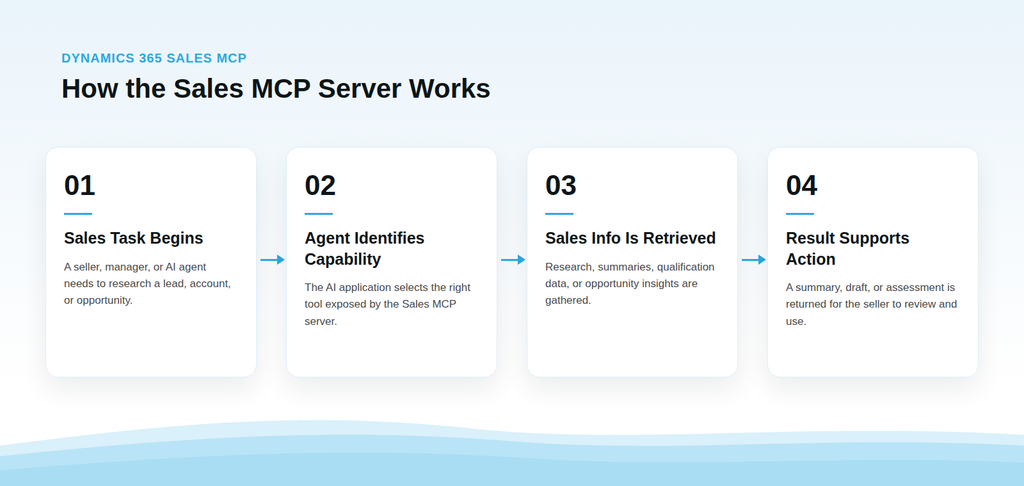
Microsoft’s documented capability list is not fixed; new tools can be added over time, so it’s worth checking current Microsoft documentation before finalizing a production workflow rather than relying on a point-in-time list, including this one.
Dynamics 365 Sales MCP vs. Dataverse MCP
These aren’t two competing options; their complementary capabilities that can be used together when a workflow requires both sales-specific AI capabilities and broader Dataverse operations.
| Sales MCP | Dataverse MCP | |
| Scope | Sales-specific insight and generation | General-purpose Dataverse data and schema operations |
| Core tools | Research, qualification, opportunity analysis, outreach drafting | search_data, create_record, update_record, delete_record, read_query, create_table, update_table, delete_table, describe, file upload/download and other Dataverse capabilities |
| Writes to CRM records | Sales MCP focuses primarily on sales capabilities; Dataverse record operations are also supported | Yes — create, update and delete record operations are available, subject to permissions and applicable controls |
| Claude Desktop support | Not currently supported for the Sales MCP server | Supported |
| Copilot Studio | Supported | Supported |
If an agent only needs to research a lead and draft a follow-up, the Sales MCP capabilities may cover the requirement. If the workflow also needs broader Dataverse operations — such as creating a task, updating an opportunity field, or performing another record operation, the appropriate Dataverse capabilities can be made available as part of the agent configuration.
Microsoft’s setup guidance distinguishes the sales-specific capabilities from the broader Dataverse capabilities. This makes it important to select the MCP server and tools that match the workflow rather than assuming that one server must handle every operation.
One more distinction worth flagging for anyone maintaining tool allow-lists: Dataverse MCP’s tool surface has changed since launch. describe_table, list_tables, and fetch were retired in favor of the current describe capability, and the original data-search search tool was renamed search_data. If you’ve hard-coded tool names into an agent’s permission set, that’s worth re-checking.
Dynamics 365 Sales MCP and Copilot Studio
Microsoft Copilot Studio connects to MCP servers, providing a supported way to build custom agents that can use MCP tools.
A typical build:
- Receives a request (e.g., “prep me for my 2pm with Contoso”).
- Calls the relevant Sales MCP tools, account research, opportunity health, and recent activity.
- Optionally calls Dataverse MCP if the agent needs to perform broader Dataverse operations such as creating or updating a record.
- Summarizes findings and presents them for review.
Sales MCP isn’t limited to Copilot Studio, though. It can also be used with other compatible MCP clients, including documented developer scenarios such as VS Code with GitHub Copilot, depending on the server and client configuration.
None of this replaces process design. An agent surfaces information faster, it doesn’t fix an undefined qualification process, inconsistent field usage, or unclear record ownership. Those have to be sorted out first, or the agent just automates the confusion.
Where Does MCP Fit in a Dynamics 365 Environment?
MCP is an addition to the architecture, not a replacement for it. A typical Microsoft environment already includes Dynamics 365 Sales, Dataverse, Power Automate, Copilot Studio, Business Central or other Dynamics 365 apps, and existing API integrations. MCP gives AI agents a standardized way to reach tools and capabilities in that stack, it doesn’t ask you to rebuild any of them.
Microsoft has also documented cross-application MCP scenarios: an agent working with Sales MCP can hand off to a Business Central MCP server to support a quote-related process once the lead confirms interest, for example. That’s where MCP can create value beyond a single application a workflow that depends on context from more than one system or team.
For a business with a working Dynamics 365 environment, the right question isn’t “how do we replace our integrations with MCP.” It’s “where does MCP let our agents reach capabilities we already have, faster.”
MCP vs. APIs, Connectors, and AI Agents
| Technology | Primary Role |
| API | Enables applications to communicate and perform defined operations |
| Connector | Simplifies pre-built connections between applications and services |
| MCP | Standardizes how AI applications discover and call tools across connected systems |
| AI Agent | Uses available tools, data, and instructions to complete a defined task |
These work together, not in competition. An organization can keep its existing API integrations for deterministic, system-to-system processes and use MCP where an AI agent needs standardized access to tools and data.
The AI agent determines which tool to call based on the task; MCP provides the standardized mechanism for discovering and invoking those tools. There’s no requirement to rebuild a working integration just because MCP exists.
Practical Dynamics 365 Sales MCP Use Cases
Faster lead qualifications. A new lead enters Dynamics 365 Sales. An agent calls to get lead research and get lead qualification assessment to give the seller a qualified starting point instead of a blank record.
More efficient opportunity reviews. A sales manager reviewing pipeline can call get opportunity health and get opportunity top risks across open deals instead of opening each one individually, then focus attention on the opportunities that require further review.
Faster meeting preparation. Before a customer call, get sales account catchup combined with get answer from sharepoint_documents can pull both CRM history and relevant contract or proposal content into one briefing.
More relevant outreach. Draft outreach email prepares a message using available lead and account context; the seller reviews, edits, and sends it, the tool doesn’t send it automatically.
Cross-functional workflows. A lead that qualifies through Sales MCP can trigger a handoff to another business application’s MCP server Business Central for a quote-related process, Customer Service for an existing case extending the workflow past sales alone.
Security and Governance Considerations
Connecting an agent to Sales MCP and Dataverse MCP does not automatically grant the agent unrestricted access to CRM data. Access depends on the identity, authentication method, permissions, environment configuration, and tools made available to the agent.
Before production use, organizations should define:
- Agent identity. Whether the agent operates using the user’s authenticated context or a separately configured identity, and whether that identity has appropriately scoped permissions.
- Tool allow-lists. Which tools an agent can call there’s rarely a reason a seller-facing agent needs access to administrative table-management operations.
- Approval gates. Which write or delete operations should require explicit approval, based on the risk of the action and the organization’s governance requirements.
- Data movement and residency. Where SharePoint search and document-grounding tools send or process content, particularly for regulated data.
- Credit consumption. MCP and agent usage can consume Copilot Studio credits depending on the underlying agent’s feature and licensing. A multi-step workflow (research → assess → summarize → draft) can involve multiple metered operations, so organizations should review the applicable licensing and consumption model for their deployment.
A Practical Model: Read → Review → Recommend → Approve → Execute. Not every action needs to be autonomous, keeping a human approval step on higher-risk actions is a reasonable default, not a limitation.
How Should Businesses Prepare for MCP?
1. Identify a specific sales problem: lead research, opportunity reviews, meeting prep, or outreach prep are practical starting points, since they’re repetitive and time-consuming.
2. Review CRM and Dataverse data quality first. An agent summarizing a pipeline with stale close dates will produce a potentially misleading forecast. Duplicate records, incomplete fields, and inconsistent ownership all degrade output quality before the AI is even involved.
3. Map the existing architecture: how Dynamics 365 Sales currently connects to Dataverse, Business Central, Power Platform, and any custom integrations, so MCP fills a gap instead of duplicating something that already works.
4. Determine which specific tools are needed: research and qualification tools alone, versus opportunity analysis, versus broader Dataverse operations.
5. Define permissions and approval requirements before connecting anything to production data.
6. Pilot on one workflow. Measure time saved, adoption, accuracy, and data quality impact before expanding.
How Sarakadiya Can Help
MCP is only as valuable as the Dynamics 365 environment it’s connected to. For most businesses, the real questions aren’t about the protocol they’re about fit:
- Where does MCP fit into our existing architecture?
- Which sales processes should we improve first?
- What should stay an API or connector integration?
- Where does Dataverse MCP make sense alongside Sales MCP?
- Would Copilot Studio give our users a better experience than a custom build?
- What data, permissions, and governance need to be in place before deployment?
Sarakadiya helps businesses with Microsoft Dynamics 365 consulting, implementation, integration, customization, and optimization. Our team can assess your existing Dynamics 365 environment, identify practical AI and Sales MCP use cases, review your current integrations, and determine where Sales MCP, Dataverse MCP, Copilot Studio, and other Microsoft technologies fit your actual business processes.
Whether you’re modernizing an existing CRM environment or planning a new Dynamics 365 implementation:
Identify the problem first, understand the existing architecture second, and choose the technology third.
Frequently Asked Questions
Final Thoughts
Dynamics 365 Sales MCP gives compatible AI agents a standardized way to work with sales capabilities, but the technology isn’t the outcome. The value is reducing research time, better pipeline visibility, and more connected workflows across the Microsoft business application stack.
Start with the sales problem. Understand what’s already been built. Then decide where MCP, and specifically, which Sales MCP and Dataverse MCP capabilities actually fit.
Sarakadiya can help you evaluate your Dynamics 365 environment, identify practical MCP use cases, and build an implementation approach aligned with your business.