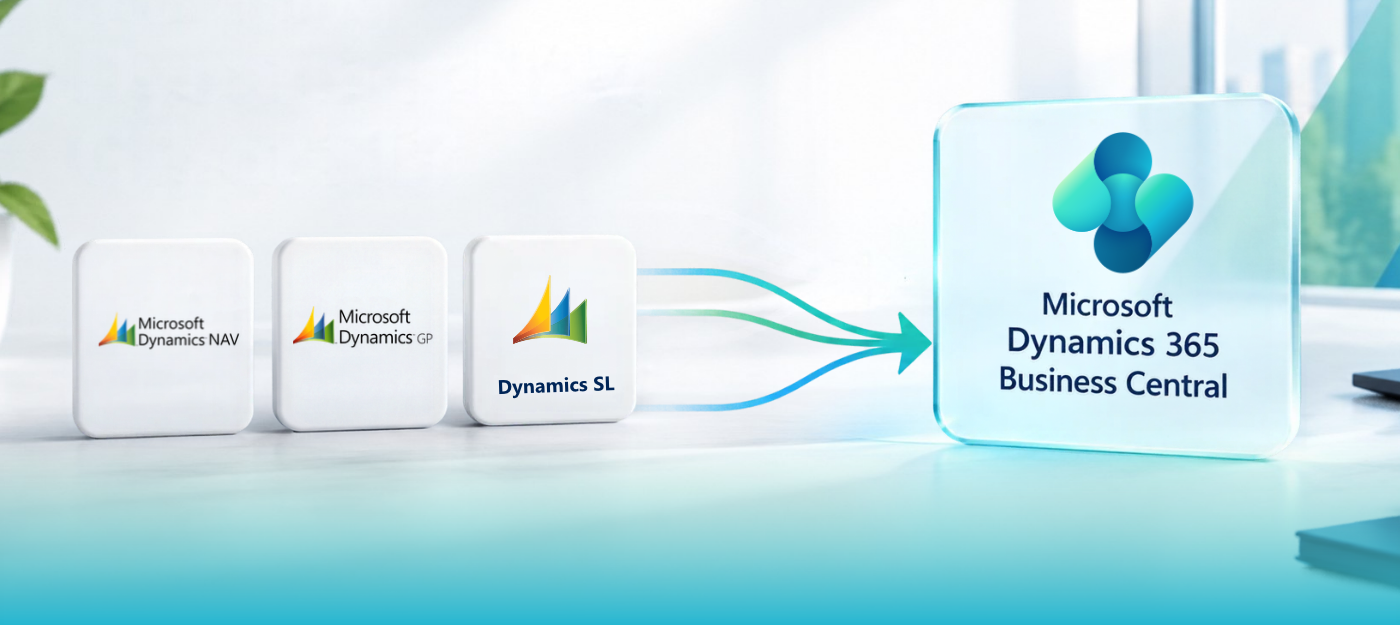





Short answer: You don’t have to migrate immediately, but you should start planning now. Dynamics NAV 2018 reaches end of support on January 11, 2028. Dynamics GP support ends December 31, 2029, while Dynamics SL 2018 reaches end of support on July 11, 2028. Microsoft provides migration paths from supported NAV, GP and SL versions to Dynamics 365 Business Central. Migration projects involve data decisions, customization rework, integration mapping and user readiness that take time to plan and validate.
Last reviewed: September 2026. Lifecycle dates and migration requirements are set by Microsoft and can change, so confirm the current Microsoft Learn documentation before making decisions.
This guide is for organizations running Microsoft Dynamics NAV, Dynamics GP or Dynamics SL that are evaluating Business Central migration, ERP modernization or continued operation of their current environment.
What are the Microsoft lifecycle dates for NAV, GP and SL?
| Product | Key dates |
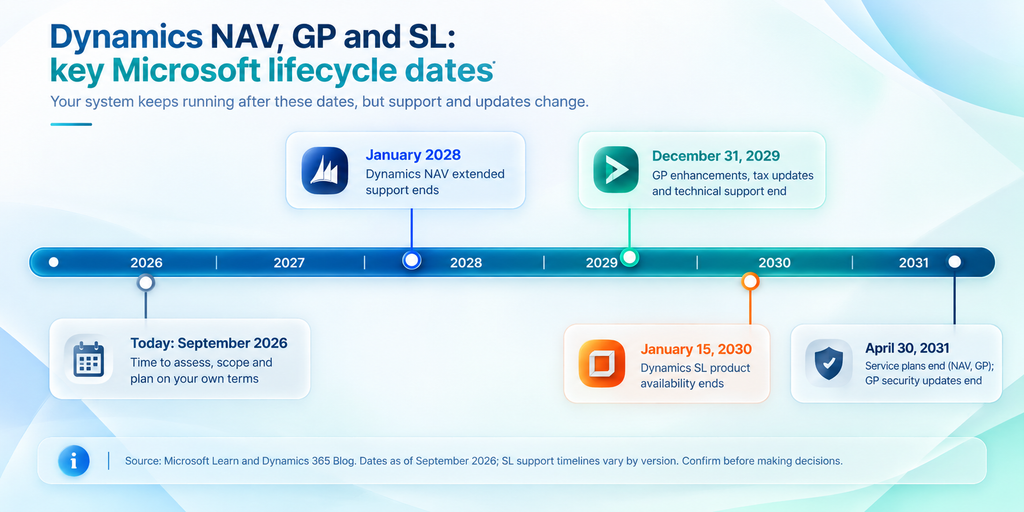
| Dynamics NAV | Dynamics NAV 2018 reaches end of support on January 11, 2028. Earlier NAV versions may have different lifecycle dates. Microsoft provides supported migration paths from Dynamics NAV to Business Central online. |
| Dynamics GP | Dynamics GP support ends December 31, 2029 for product enhancements, regulatory (tax) updates and technical support. Security updates and patches, if needed, are available until April 30, 2031. |
| Dynamics SL | Dynamics SL 2018 reaches end of support on July 11, 2028. Support timelines vary by SL version, so organizations should check the lifecycle date for their specific release. |
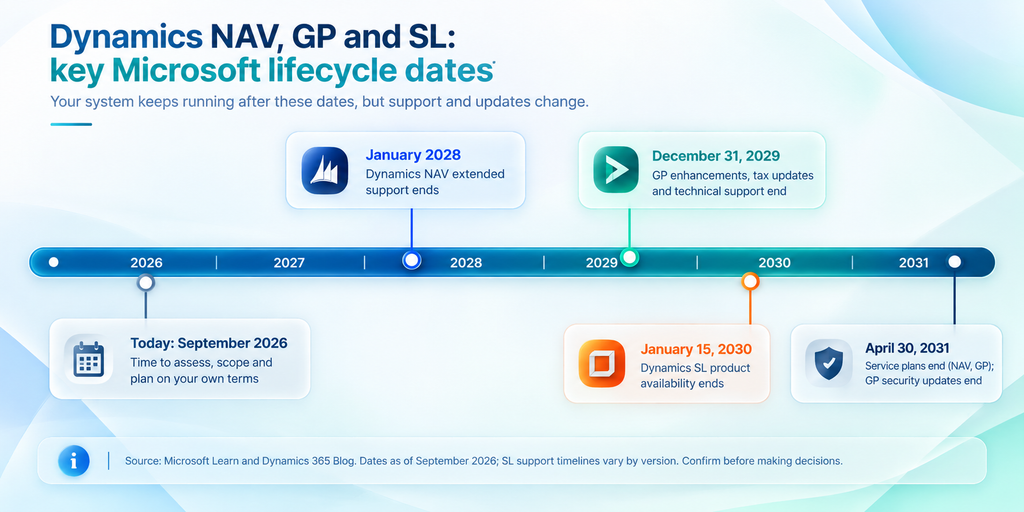
Key Microsoft lifecycle milestones for Dynamics NAV, GP and SL.
Older NAV, GP and SL releases may reach end of support sooner, so check the date for your
specific version.
These dates are a reason to plan, not to panic. Your system won’t stop working on the day support ends. But after support ends, you may face greater security, compliance, maintenance and skills risks, while access to Microsoft support and product updates becomes more limited.
Do you actually need to migrate?
Not “because Microsoft said so,” and not “because it still works.” Both are incomplete answers. Ask instead:
- Will the current ERP support new locations, products, customers or business models?
- How dependent is it on custom code, and how many systems connect to it?
- Are maintenance costs rising, or is it getting harder to find people who can support it?
- Are reporting and month-end close slower than they should be?
- Are teams building workarounds around system limitations?
If most answers point to growing complexity or support risk, migration deserves serious attention. If the system still fits and there is a strong reason to stay, “not yet” is a legitimate answer. Planning still matters, because it means you decide on your own timeline.
Why does starting early lower risk?
Migration decisions compound. Data scope, customization strategy, integration design,
training and testing all depend on one another. Project timelines vary significantly based on ERP version, data volume, customizations, integrations and organizational readiness. Complex environments can take many months from discovery to go-live, so starting at the deadline leaves less room to validate decisions and resolve issues. Early planning gives you time to:
- clean and scope your data,
- challenge customizations that no longer earn their place,
- decide between migration and reimplementation,
- validate integrations and reporting requirements,
- involve users before go-live.
What should CEOs, CFOs and IT leaders evaluate?
Executives don’t need the technical detail, but they should own these six decisions:
- Business fit: What will the company look like in three to five years: more entities, new channels, acquisitions, international growth?
- Total cost: Include infrastructure, support, custom development, integrations, internal IT effort and third-party add-ons, not just licensing.
- Data: Decide what finance, operations and compliance need before the technical team decides how to move it.
- Customizations: Don’t rebuild by default. Some exist only because the old system couldn’t do something easily.
- Integrations: Map every connection (CRM, e-commerce, banking, payroll, warehouse, shipping, payments, reporting) and decide what stays, changes or retires.
- People: Adoption determines success. Data appearing in the new system is not the same as users working confidently in it.
How should you start? Begin with an assessment
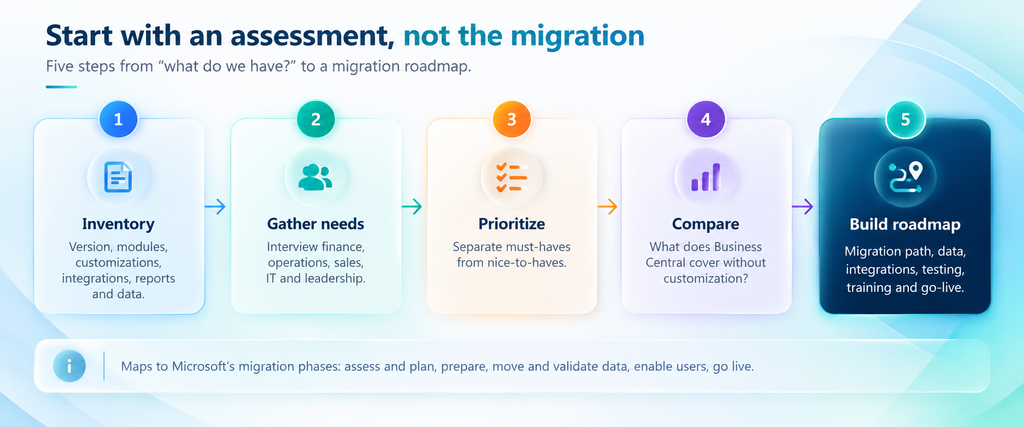
A five-step assessment comes before any migration decision.
- Inventory your environment: version, modules, customizations, integrations, reports, third-party add-ons and critical processes.
- Gather requirements: interview finance, operations, sales, supply chain, IT and leadership about where the ERP helps and where it gets in the way.
- Prioritize: separate must-haves from nice-to-haves.
- Compare against Business Central: identify what it covers out of the box across finance, inventory, sales, service, manufacturing and projects, and where you would need extensions.
- Build the roadmap: define migration path, data strategy, integrations, customization plan, testing, training and go-live.
This mirrors Microsoft’s migration approach: assess and prepare, upgrade or configure the environment where required, migrate and validate data, enable users, complete the transition and follow up after migration. For help with this stage, see our Microsoft Dynamics 365 Consulting Services.
How does migration to Business Central work for each product?
How does Dynamics NAV migrate to Business Central?
Dynamics NAV does not migrate directly to Business Central online. Supported NAV versions must first be upgraded to Business Central on-premises, with the exact upgrade path depending on the NAV version. Current supported routes for NAV 2015–2018 move through Business Central version 14 and then a current supported Business Central on-premises version before moving to Business Central online. Your customization strategy decides the path:
- Standard upgrade: C/AL customizations must be converted to AL extensions. Data from tables with code customizations can’t be carried forward unless those customizations are handled through extensions.
- Reimplementation from Business Central v14: you migrate essential data only, such as master data, opening balances and required setup, and start with a cleaner environment. This option can avoid carrying forward obsolete customizations and historical data.
Reimplementation is often worth considering when years of accumulated customization have added more complexity than value.
How does Dynamics GP migrate to Business Central?
Microsoft provides built-in cloud migration tools for Dynamics GP 2015 and later. The on-premises solution must use SQL Server 2016 or later, and the database must have compatibility level 130 or higher.
The technical ability to migrate something doesn’t mean you should. Decide which history is needed daily, which is needed for reporting or compliance, and which can live in an archive or reporting layer.
How does Dynamics SL migrate to Business Central?
Microsoft supports built-in cloud migration from Dynamics SL 2015 and later, subject to technical prerequisites. The on-premises solution must use SQL Server 2016 or later, and the database must have compatibility level 130 or higher. Support timelines vary by SL version, so confirm the lifecycle status and migration requirements for your specific environment before planning the transition.
The same scoping question applies: which data belongs in your future ERP, which data is needed for reporting or compliance, and which data can be archived?
Why is Business Central a potential next step?
Microsoft Dynamics 365 Business Central is Microsoft’s cloud ERP platform for small and midsize businesses, covering finance, operations, inventory, sales, service, manufacturing and projects. It integrates with Microsoft 365, Teams, Power Platform and Azure, and provides a continuously updated cloud platform that reduces the need for traditional infrastructure management and large version upgrade cycles.
For growing organizations, the decision is not only about replacing an aging ERP. It is also about creating a platform that can support additional entities, locations, integrations and business processes without carrying forward unnecessary legacy complexity.
For executives, that translates to:
- CEO: a platform that can scale with growth
- CFO: faster access to financial and operational data
- CIO/CTO: less aging infrastructure and a clearer roadmap
- Operations: more connected processes across departments
Business Central isn’t the only option to evaluate, but it is the Microsoft-supported cloud ERP path with migration tooling for supported NAV, GP and SL scenarios.
What should decision-makers do this quarter?
Get answers to these questions from your IT and business teams:
- Which version are we running, and what is its support date?
- Which customizations, reports and integrations are truly business-critical?
- How much historical data do we need?
- What does the current ERP cost us in time and workarounds?
- What can Business Central do without rebuilding our old system?
- What happens if we wait two more years?
The cost of waiting is rarely just a bigger bill. It is fewer options, less time to test, and decisions made under pressure.
Frequently Asked Questions
How can Sarakadiya Inc. help?
Sarakadiya Inc. helps organizations assess their existing Dynamics environment, review customizations and integrations, define data scope, evaluate Business Central fit, and build a practical migration roadmap. Our Business Central Implementation and Migration Services cover assessment through go-live and ongoing support. Explore our broader Microsoft Dynamics 365 Services.