




Microsoft stopped publishing Dynamics 365 release plans in September 2026 and retired the twice-yearly release wave model. There is no 2026 Release Wave 2. New Dynamics 365, Power Platform and Dataverse capabilities are now published continuously on the AI at Work Roadmap. Release Planner retires by 15 November 2026. Product update schedules themselves are unchanged – only how Microsoft communicates them.
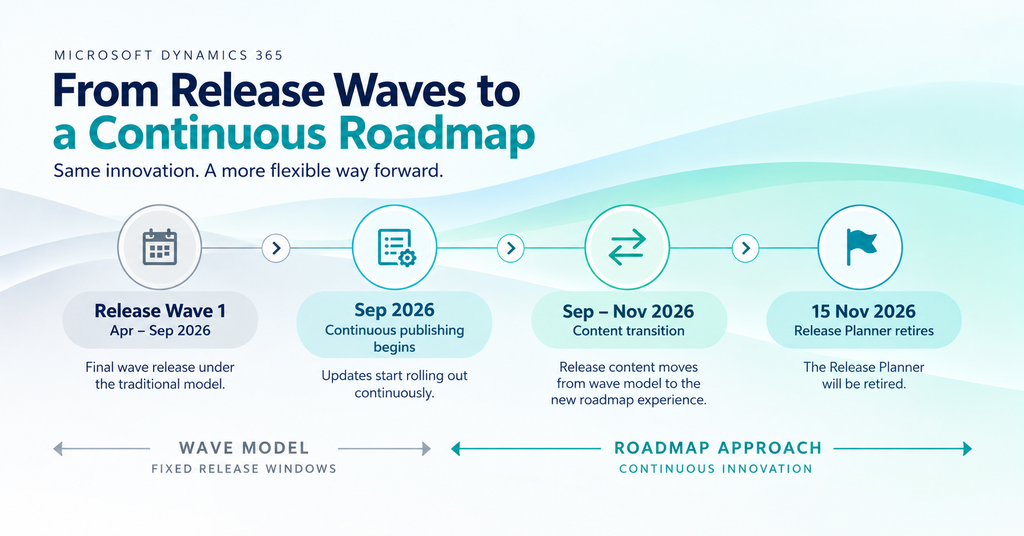
Microsoft has changed how it tells customers what is coming next in Dynamics 365, Power Platform and Dataverse.
As of September 2026, Microsoft no longer publishes new release plans. The release wave 1 and release wave 2 model that governed disclosure for years has been retired in favour of continuous publishing on the AI at Work Roadmap. Existing release plans stay online on Microsoft Learn for historical reference.
Your Dynamics 365 environment will keep receiving updates. Products with established release schedules continue on those schedules. What has changed is how you discover, track and plan for upcoming capabilities – and that has direct consequences for testing, customisations, integrations, user training and adoption.
For a mid-market organisation running Business Central, Finance, Sales, Supply Chain Management or Customer Service, the practical problem is this: the twice-yearly release wave gave you a built-in planning checkpoint. That checkpoint no longer exists. You now have to build your own.
Key takeaways
- There is no 2026 Release Wave 2, no announcement and no release plan.
- New Dynamics 365, Power Platform and Dataverse capabilities publish continuously on the AI at Work Roadmap.
- Only roadmap content with a public preview or GA date of 1 June 2026 or later transitions to the new roadmap. Earlier content remains on Microsoft Learn.
- Release Planner retires by 15 November 2026, and personalised saved views in My Release Plans will not carry over.
- Product deployment schedules are unchanged.
- Replace the wave checkpoint with a monthly or quarterly review built on a bookmarked filtered view plus an RSS subscription.
- Microsoft Learn remains the home for documentation. Message Center remains the source for tenant-specific notifications.
What exactly is changing with Dynamics 365 release plans?
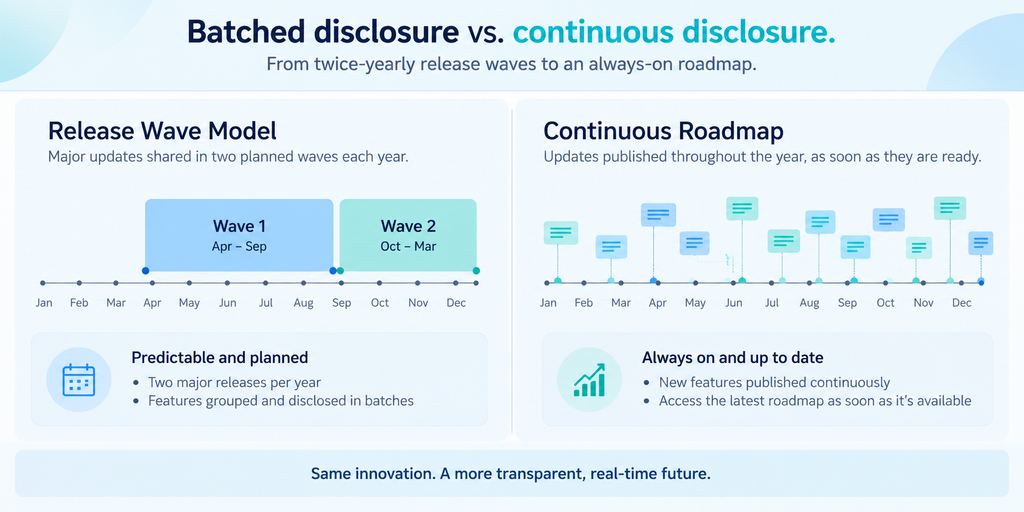
Microsoft has replaced scheduled, batched disclosure with continuous disclosure. Under the old model, planned capabilities were held until the next release wave announcement in April or October. Under the new model, Microsoft publishes a capability as soon as the plan is committed and ready to share.
Each roadmap item then stays live as it moves through three status stages – In Development, Rolling Out and Launched – with rollout information updated as plans evolve. In practice, most capabilities surface earlier than they would have under the wave calendar, and you can follow an item all the way through delivery instead of losing sight of it after publication.
Transition milestones
| Date | What happens |
| September 2026 | New Dynamics 365, Power Platform and Dataverse capabilities begin publishing to the AI at Work Roadmap. New release plans stop being published to Microsoft Learn. |
| September – November 2026 | Roadmap content with a public preview or GA date of 1 June 2026 or later transitions to the AI at Work Roadmap. Transition notifications are sent through the Message Center. |
| By 15 November 2026 | The transition completes and the Release Planner retires. The AI at Work Roadmap becomes the primary destination for public roadmap information. |
Source: Microsoft Dynamics 365 Blog, 25 August 2026
Is there a Dynamics 365 2026 Release Wave 2?
No. Microsoft has confirmed there will be no September 2026 release wave 2 announcement and no release wave 2 release plan. New capabilities are disclosed on the AI at Work Roadmap as they become committed, rather than grouped into a twice-yearly release.
The last release wave published under the old model is 2026 Release Wave 1, covering functionality planned from April through September 2026. It remains available on Microsoft Learn. If your internal governance calendar has a “Review Release Wave 2” entry booked for October, that meeting no longer has a Microsoft-supplied input. This is the most immediate practical consequence of the change.
What happens to existing release plans and saved views?
Two different things happen, and it is worth separating them because one is harmless and one is not.
Existing release plans are safe. Previously published release plans stay on Microsoft Learn for historical reference until further notice. You can still research an older announcement or trace when a feature was first disclosed.
Your personalised saved views are not. Saved views built in My Release Plans inside Release Planner disappear when Release Planner retires. The AI at Work Roadmap does not offer personalised saved views as a replacement.
If your team relies on saved views today, act before 15 November 2026:
- Export what you currently track to CSV while Release Planner is still live.
- Rebuild each view as a filtered URL on the AI at Work Roadmap and bookmark it.
- Attach an RSS subscription to that filtered view so changes reach you without a manual check.
- Update internal documentation, wiki links and bookmarks that point at Release Planner URLs.
What is the AI at Work Roadmap?
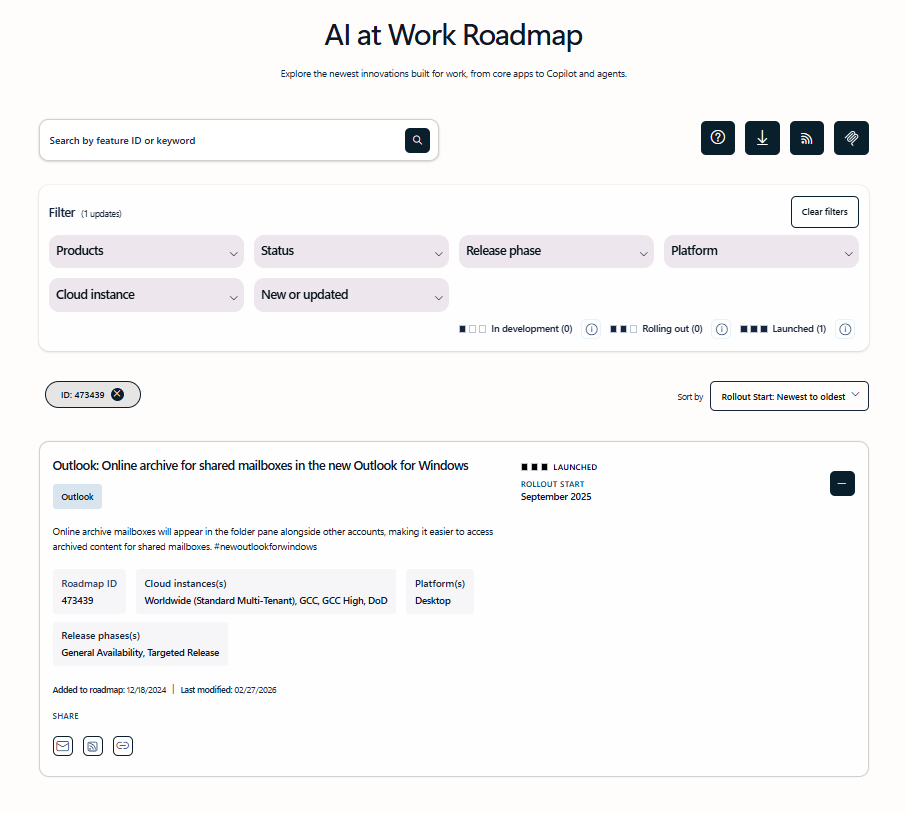
The AI at Work Roadmap is Microsoft’s single public destination for upcoming capabilities across Microsoft 365, Copilot, agents, Dynamics 365, Power Platform and Dataverse. It provides estimated release dates and feature descriptions for commercial features.
Microsoft’s reasoning for consolidating is that very few organisations run one Microsoft product in isolation. Dynamics 365, Power Platform, Microsoft 365, Copilot and agents built in Copilot Studio increasingly operate together, so a single-product roadmap no longer describes where a business process is heading.
What the roadmap lets you actually do
The roadmap is built for planning rather than browsing. Five capabilities matter for a working review process:
- Filter views to the products and cloud environments your organisation uses.
- Export a complete or filtered view to CSV.
- Subscribe to a filtered view through RSS.
- Share roadmap links directly with stakeholders.
- Search using feature IDs and advanced filters.
Microsoft also publishes an AI at Work Roadmap guide explaining how to read and use it.
Querying the roadmap with AI
For teams that would rather query the roadmap than browse it, Microsoft offers the Release Communications MCP Server, a remote Model Context Protocol server that lets MCP-compatible AI clients search, filter and retrieve feature release information in natural language. Underlying data refreshes daily.
Tools such as Visual Studio Code and GitHub Copilot CLI can connect to it, so an administrator can ask about upcoming features and rollout timelines inside the tools they already work in, instead of opening a website. A separate server, Microsoft MCP for Enterprise, gives AI agents read-only conversational access to an organisation’s own Message Center and Service Health Dashboard data.
This is worth a governance conversation. If AI clients in your environment can pull roadmap and rollout information automatically, decide now who is allowed to connect them and how the output is reviewed before it informs a decision.
Release waves vs. the always-on roadmap
| Earlier model | Current model |
| Release Wave 1 and Release Wave 2 | Continuous publishing |
| Capabilities held until a scheduled announcement | Capabilities published when committed |
| Release Planner (retiring 15 Nov 2026) | AI at Work Roadmap |
| Personalised saved views | Bookmarked filtered URLs + RSS |
| Review twice a year | Monthly or quarterly review you define |
| Dynamics 365 and Power Platform scope | Microsoft 365, Copilot, agents, Dynamics 365, Power Platform and Dataverse |
| Release plan pages on Microsoft Learn | Roadmap entries with live status through delivery |
What does this mean for Business Central customers?
Business Central continues to receive updates across finance, supply chain, reporting, Microsoft 365 integration, development, AI and automation. That has not changed. What has changed is that those updates now arrive on your radar individually and continuously rather than as a packaged list twice a year.
For a mid-market Business Central customer with custom extensions, integrations and Power Platform workflows, the risk profile shifts in two directions at once. You are more likely to hear about a relevant capability early, and more likely to miss one entirely if nobody is watching.
The commercial question is not “what new features are available?” It is “which changes can improve how our business operates, and which could disturb something that currently works?”
A single Business Central change can touch:
- Finance processes and period close
- Purchasing and supplier management
- Inventory visibility and planning
- Manufacturing planning, costing and shop-floor processes
- Reporting and analytics
- Power Platform automation
- Third-party integrations
- Custom extensions (AL code)
- User permissions and data flows
A capability that behaves cleanly in a standard environment can behave differently in a customised one. That is why the disappearance of a scheduled review checkpoint matters more for heavily customised environments than for out-of-the-box ones.
What should CFOs, COOs and IT Leaders each be asking?
The change lands differently by role. One shared shift applies to all three: move from asking “what is coming?” to “what is coming, what could it affect, and are we ready?”
CFOs should test each candidate update against financial outcome: Does it improve a financial process or reduce manual work? Does it affect reporting accuracy or internal controls? What implementation, licensing and training cost does it carry? Can the resulting value be measured?
COOs should test operational impact: Which process changes? Will users need retraining? Does it alter an existing workflow or a connected system? Does it improve productivity or visibility enough to justify the disruption?
IT leaders should test technical readiness: Does it affect customisations, extensions, integrations, Power Platform flows, reports, data or security? What testing is required, and do we have the environment and capacity to do it? What is the support impact if it goes wrong?
This division of labour also solves a governance problem the wave model used to solve implicitly. When a checkpoint is scheduled by the vendor, everyone shows up. When it is not, someone has to own it.
How to build a review process that replaces the release wave
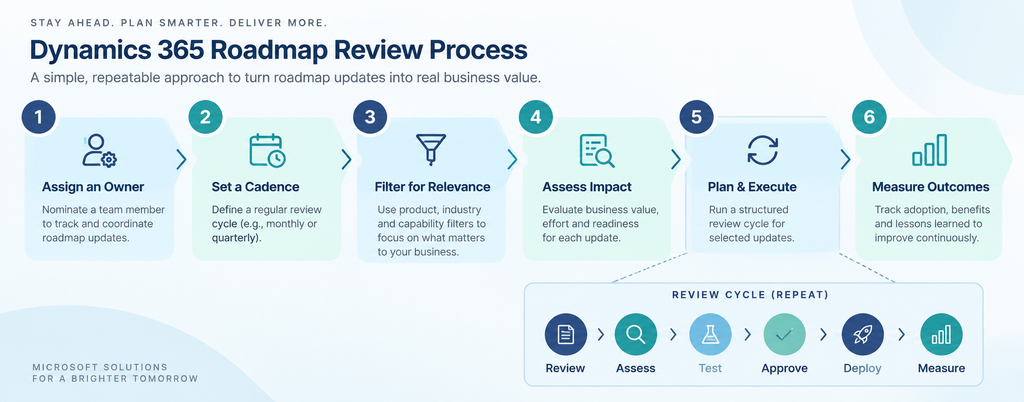
You do not need a complex framework. Six steps are enough.
1. Assign an owner. One named person monitors relevant Microsoft updates – an application owner, a Dynamics 365 administrator, a business systems lead or your implementation partner. Without a named owner, continuous publishing means nobody reviews anything.
2. Set a cadence. Monthly or quarterly, depending on how fast your organisation adopts new capabilities. Put it in the calendar as a recurring meeting with the same attendees the release wave review used to pull in.
3. Filter to your products and bookmark the URL. Select only the Dynamics 365 and Microsoft products you actually run, then bookmark the filtered view and attach RSS. Remember that the roadmap does not store personalised saved views for you.
4. Assess impact on five axes. Users (who is affected), processes (what changes), technology (which integrations or customisations are touched), cost (licensing, development, training, support) and timing (is now right).
5. Test before wide release. Validate significant changes in a sandbox that reflects your real customisations, extensions and integrations — not a clean environment. Run the sequence: Review → Assess → Test → Approve → Deploy → Measure.
6. Measure the result. After adoption, check whether it actually saved time, reduced manual work, improved accuracy or reduced support tickets. If not, that tells you something useful about how you prioritise the next one.
Where should you track Dynamics 365 updates now?
Each source answers a different question. Using one for all four jobs is the most common mistake after a change like this.
| Source | Answers the question | Use it for |
| AI at Work Roadmap | What is coming? | Public roadmap, estimated dates, rollout status |
| Microsoft Learn | How does it work? | Product documentation, implementation guidance, archived release plans |
| Message Center | What affects our tenant? | Tenant-specific change notifications, transition notices |
| Release Communications MCP Server | Can my tools query this? | Natural-language roadmap queries inside AI-enabled tooling |
| Sarakadiya | What does it mean for us? | Business impact assessment, testing, customisation and integration review, support |
Roadmap information is not a commitment. Microsoft states that estimated dates and planned functionality are subject to change, and features can be postponed, cancelled or removed. Plan accordingly, do not schedule a go-live around a roadmap date alone.
Should every new Dynamics 365 feature be adopted?
No. Availability is not a business case. Weigh each update against five factors before enabling it:
- Business value: does it solve a problem you actually have?
- User impact: will employees use it, and what training does it need?
- Technical impact: does it touch integrations, customisations, data or existing processes?
- Cost: implementation, licensing, training and ongoing support.
- Timing: is this the right quarter for this change, given everything else in flight?
This framing guards against the two failure modes that continuous publishing makes more likely. The first is drift: nobody monitors the roadmap, so useful capabilities are missed for a year. The second is sprawl: features get switched on without checking value, impact or readiness, and the support queue absorbs the consequences.
The goal is not maximum adoption. It is deliberate adoption.
Frequently asked Questions
The bottom line
Microsoft has not stopped updating Dynamics 365. It has stopped scheduling the conversation about those updates.
From September 2026, new Dynamics 365, Power Platform and Dataverse capabilities appear continuously on the AI at Work Roadmap. Existing release plans stay on Microsoft Learn as an archive. Release Planner retires by 15 November 2026, taking personalised saved views with it.
For mid-market organisations, the correct response is not to track more. It is to track deliberately: review, filter, assess, test, adopt, measure – and never adopt a feature simply because it is new.